Introduction
CLI coding agents moved from novelty to default workflow in under two years. The terminal is now a place where code gets written, tests get executed, PRs get opened, and incidents get triaged with an agent sitting next to your shell history.
That’s good for throughput. It’s also a new kind of operational risk. The failure mode is not “bad code suggestion”. It’s silent drift: different agents, different permissions, different models, different billing, and no shared definition of what “good” looks like.
This guide is for CTOs and Heads of Engineering who need AI coding tool standardization without freezing teams or betting the company on a single vendor.
What you should get out of it:
- A clear read on the CLI coding agents 2026 landscape and why consolidation is already happening
- A pragmatic view of GitHub Copilot Desktop GA and the rise of agent control planes
- How open harnesses like OpenCode, Aider, and multi provider CLIs change the power balance
- Why the Gemini CLI retirement matters more than the tool itself
- Templates: decision matrix, team policy, cost governance, and a 90 day rollout
Insight: Standardization is not picking “the best agent”. It’s picking approved surfaces, permissions, and metrics so teams can move fast without creating audit debt.
What we mean by standardize
Standardize does not mean one tool for everyone.
It means:
- One approved harness layer (or two) that teams can swap models under
- One permission model for repo, secrets, and production adjacent actions
- One telemetry and cost model so finance and security stop guessing
- One escalation path when an agent does something weird or expensive
If you do that, teams can still argue about prompts and workflows. That’s fine. You’ve contained the blast radius.
_> Standardization signals to track
If you can’t measure it, you can’t govern it
The 2026 CLI agent landscape
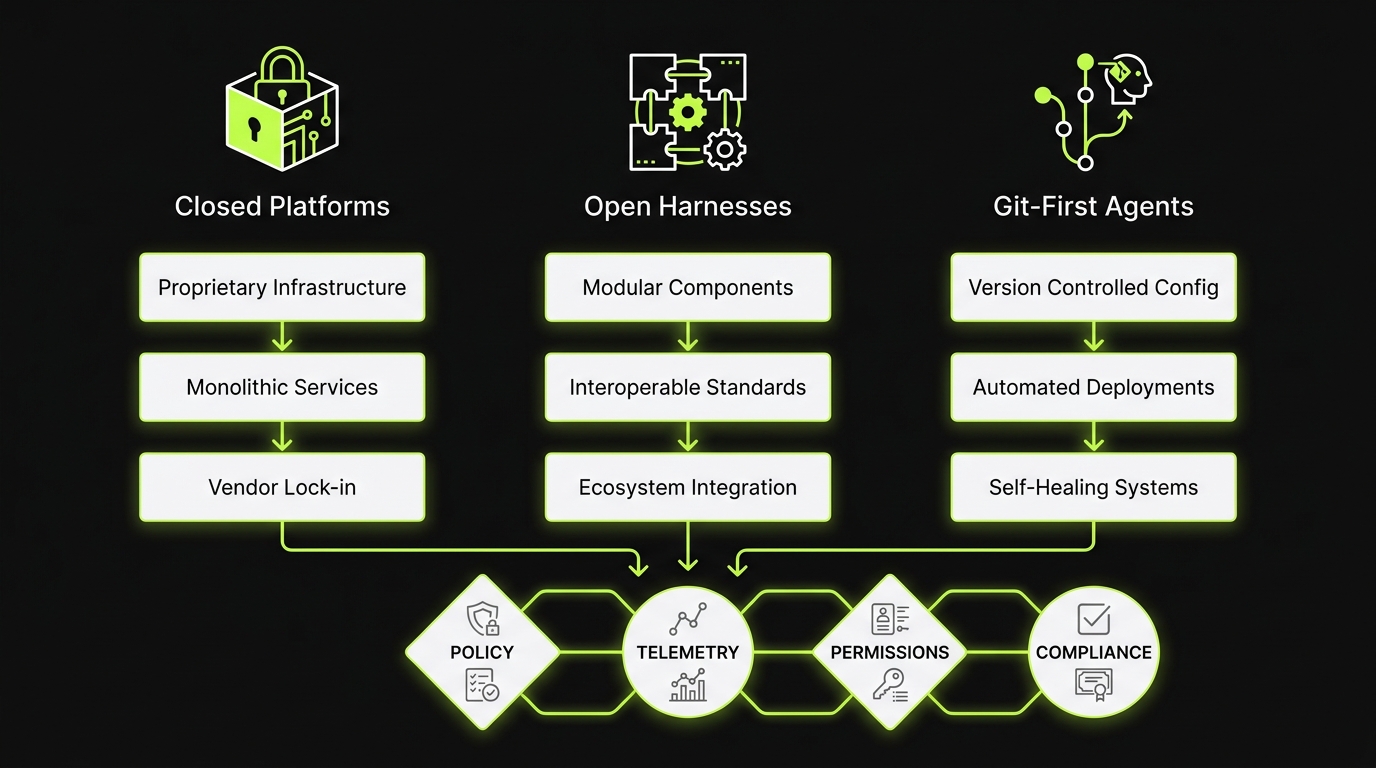
By mid 2026, we’re past “a few tools”. We’re in a crowded market with 35+ maintained terminal AI coding agents across closed platforms, open source harnesses, and git first workflows.
You can feel the consolidation pressure in three places:
- Vendors shipping control planes and bundling agents into existing seats
- Open source projects converging on similar primitives: tools, permissions, evals, and provider switching
- Security teams forcing a smaller set of approved surfaces
Practical implications for engineering leaders:
- Your tool sprawl is now a budget line item
- Your agent choice is now a compliance decision
- Your onboarding speed depends on whether the agent fits your repo and CI conventions
Key Stat (internal proof point): Across 360+ projects delivered, the consistent pattern is that teams ship faster when tooling is standardized around CI, code review, and audit trails, not personal preference.
Consolidation pressure is rational
Most orgs do not want to maintain:
- 6 different billing models
- 4 different permission systems
- 3 different ways to log and audit agent actions
So consolidation happens even when engineers like variety.
If you don’t force a decision, you’ll get one anyway. It will be made by procurement after the first surprise bill or security incident.
Terminal AI coding agents change the risk profile
Terminal agents are closer to the blast radius than IDE autocomplete.
Common failure modes we see in delivery:
- Agents running “helpful” commands that mutate the repo without a clean diff
- Tests not run, or run in the wrong environment
- Secrets exposure through shell history, logs, or pasted configs
- Over eager refactors that pass unit tests but break integration behavior
Mitigations that hold up in production:
- Require git clean diffs for any change
- Default to read only repo access and explicit elevation
- Force “test then propose” workflows for anything that touches core modules
What a production ready agent setup includes
_> Tooling is the easy part. Guardrails are the work.
Identity and access
SSO, least privilege tiers, and time boxed elevation for write actions.
Audit logs
Transcripts, tool calls, diffs, model identifiers, and retention aligned to your CI policy.
Git first artifacts
Every change is a diff, linked to a PR, with tests executed and recorded.
Cost attribution
Spend tracked by repo and workflow, with budgets, limits, and anomaly alerts.
Quality gates
Linters, tests, security scans, and evals that catch regressions before merge.
Provider portability
Adapter layer so model churn becomes configuration, not retraining.
Copilot Desktop GA and agent control planes
The biggest shift is not a new model. It’s packaging.
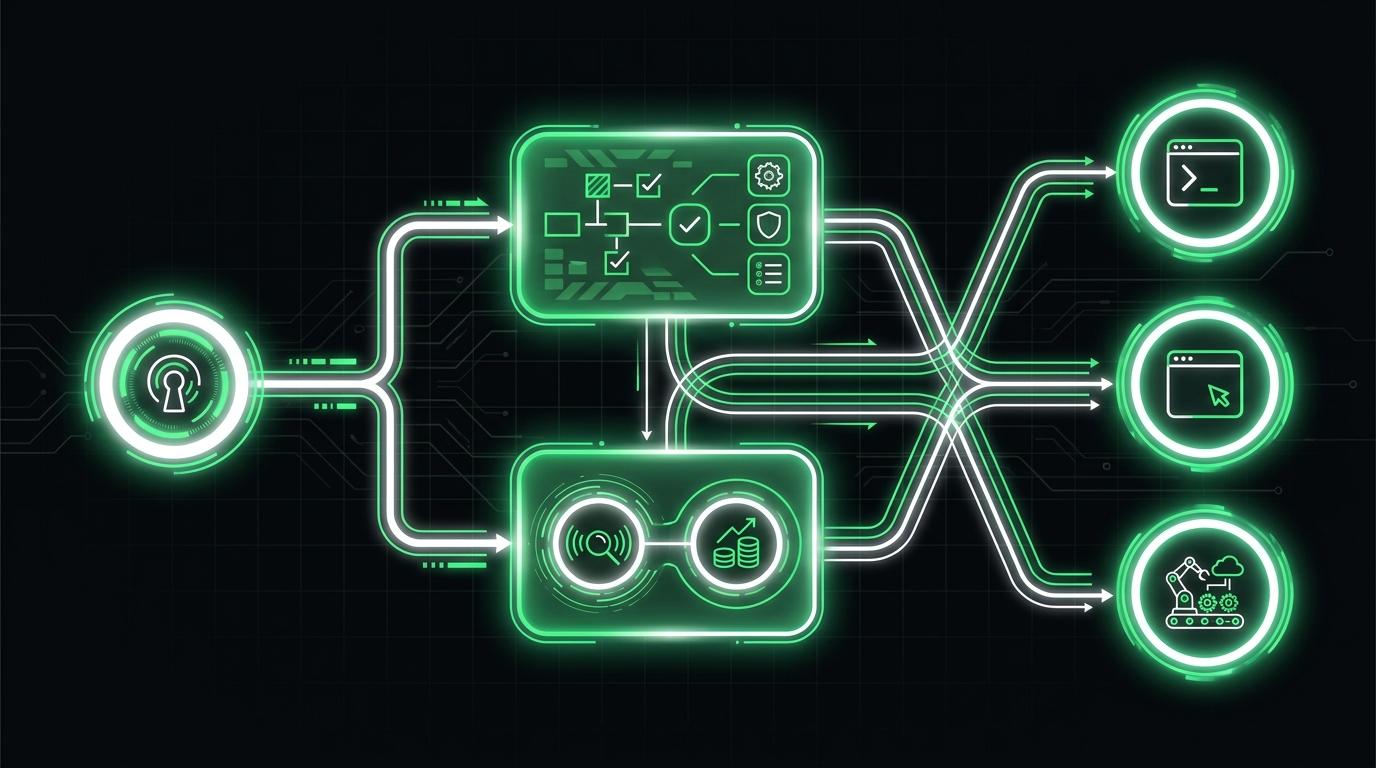
With GitHub Copilot Desktop GA, the agent is moving into a managed surface with a growing control plane story: identity, policy, and reporting. For many enterprises, that’s the first time security and procurement can say “yes” without inventing a new process.
That doesn’t mean it’s the best fit for every team.
Where it tends to work well:
- Orgs already standardized on GitHub identity and enterprise controls
- Teams that need predictable procurement and support paths
- Environments where security wants fewer moving pieces
Where it gets tricky:
- Multi provider strategies where model choice matters by workload
- Teams that need custom tools, custom evals, or deep terminal automation
- Cost governance when autonomous workflows multiply token usage
Insight: Control planes reduce chaos, but they can also hide cost and reduce your ability to switch models when quality shifts.
What to standardize if you adopt Copilot Desktop
If Copilot Desktop becomes your default, standardize around the parts that prevent drift:
- Approved repos and orgs it can access
- Allowed actions: read, write, open PR, run tests, trigger CI
- Logging: where transcripts and tool calls go, and retention policy
- A single “break glass” path for elevated permissions
Also decide what you will not do:
- No direct production access
- No writing to secrets stores
- No auto merge without human review
Those constraints keep the agent useful while keeping your audit story sane.
Control plane gaps to watch
In 2026, most control planes still have rough edges:
- Partial visibility across terminal, IDE, and CI usage
- Inconsistent redaction of secrets in transcripts
- Limited support for custom evals tied to your codebase
Treat these as engineering tasks, not vendor promises. If you can’t measure it, you can’t govern it.
Don’t ask: Which agent is smarter? Ask:
- Can we enforce permissions consistently?
- Can we log tool calls and diffs for audits?
- Can we switch providers without retraining the whole org?
- Can we explain cost per PR to finance?
If you can’t answer these, you’re not standardizing. You’re just picking a brand.
Open harness momentum: OpenCode, Aider, and multi provider CLIs
The counterweight to closed platforms is the open harness trend.
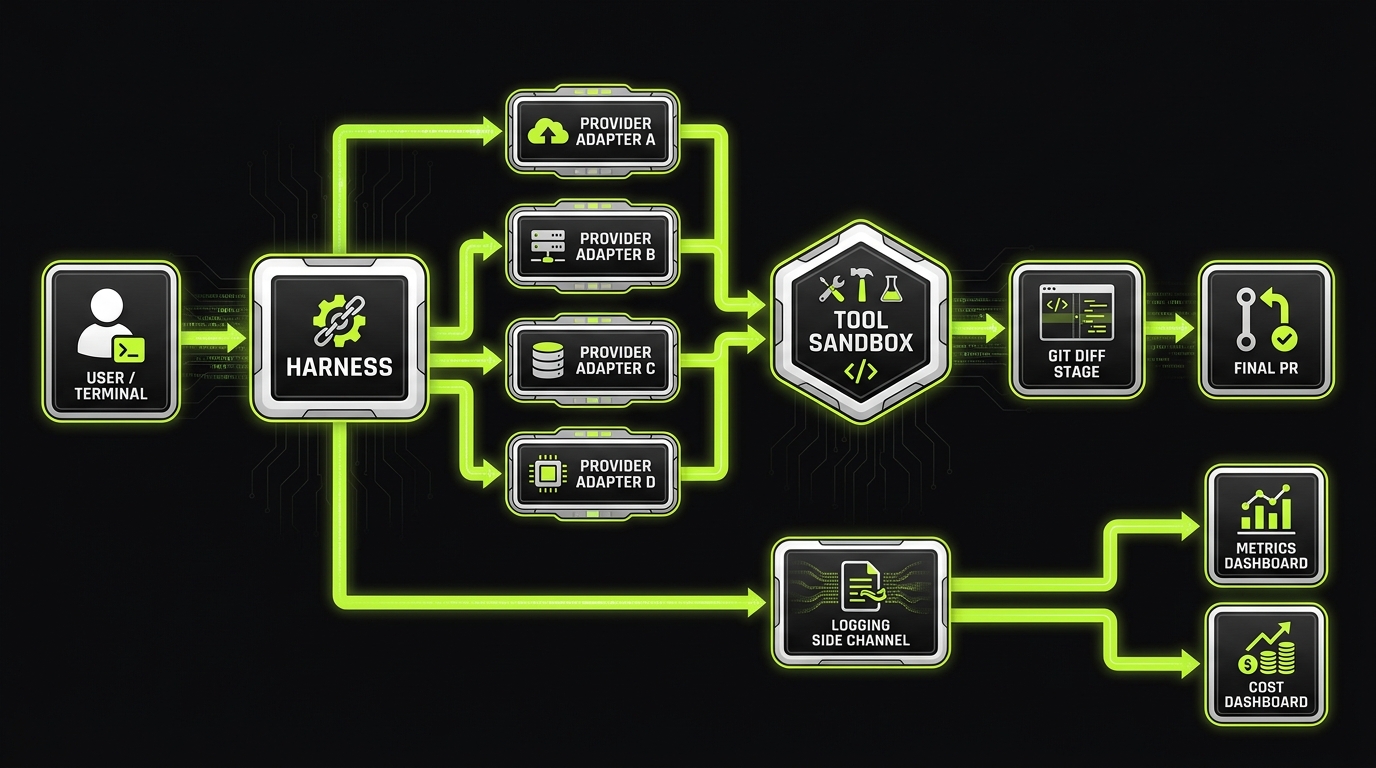
Open harnesses like OpenCode, Aider, and other multi provider CLIs are getting adopted because they solve a simple leadership problem: standardize the interface, not the model.
This matters in practice:
- You can switch providers when quality shifts, pricing changes, or a tool gets retired
- You can run the same harness locally, in CI, and in secure build environments
- You can add org specific tools with explicit permissions
This is the heart of the OpenCode vs Copilot CLI conversation. It’s not “which is smarter”. It’s “which architecture reduces churn and lock in”.
Example: In our work building AI heavy features for SaaS teams, the systems that held up were the ones with a harness layer, explicit tools, and evals in CI. The model changed. The harness stayed.
Why open harnesses win political fights
Standardization often fails for non technical reasons.
Open harnesses help because:
- Engineers keep autonomy over models and workflows
- Security gets one place to enforce permissions and logging
- Procurement gets a smaller set of contracts, sometimes just one
The tradeoff is ownership. Someone has to maintain the harness config, providers, and guardrails. If you don’t have that capacity, a managed surface may be the right first step.
Aider and git first workflows
Git first workflows are underrated.
Aider style approaches work well when you need:
- A clean diff for every change
- A strong review culture
- A paper trail for audits
They struggle when teams want conversational, long running agent sessions that orchestrate many tools. You can still do it, but you’ll need stricter policies around tool execution and state management.
Gemini CLI retirement and churn math
The Gemini CLI retirement is a reminder: single vendor bets create churn.
Churn costs show up as:
- Re training time across the org
- Broken scripts and wrappers
- Changed auth flows and new security reviews
- Lost productivity during migration
Insight: The best time to design for provider churn is before your first standardization memo goes out.
A harness plus policy approach makes churn mostly a provider adapter change, not a team wide workflow rewrite.
Benefits of AI coding tool standardization
Faster onboarding
New engineers learn one approved surface and one escalation path, not a grab bag of personal setups.
Lower security friction
Security reviews the harness and policy once, then monitors logs instead of chasing tool rumors.
Predictable spend
Budgets and attribution reduce surprise invoices and make ROI conversations concrete.
Less vendor churn pain
Provider changes become adapter swaps, not org wide retraining and workflow rewrites.
Standardization without lock in
If you only standardize on a vendor, you’re renting your workflow.
If you only standardize on open source, you may be volunteering to run a small platform team.
The middle path is boring and effective: harness + policy + metrics.
What to standardize across all terminal AI coding agents:
- Approved surfaces: which tools are allowed (desktop, CLI, CI agent)
- Permission tiers: read, write, PR, merge, deploy adjacent
- Audit logging: transcripts, tool calls, diffs, and reviewers
- Quality gates: tests, linters, security checks, and evals
- Cost controls: budgets, rate limits, and anomaly detection
Key Stat (project proof point): For Mobegí style assistant work, we saw evaluation discipline matter more than model choice. Teams that added tracing and repeatable datasets caught regressions early and avoided “works in demo” failures.
Decision matrix: closed vs open harness vs git first
Use this matrix in your tool review. Don’t score “vibes”. Score operational fit.
| Dimension | Closed platform (Copilot Desktop, etc.) | Open harness (OpenCode, multi provider) | Git first (Aider style) |
|---|---|---|---|
| Procurement and support | Strong | Mixed | Mixed |
| Provider flexibility | Low to medium | High | Medium |
| Security policy enforcement | Medium to high | High if implemented | Medium |
| Audit trail quality | Medium | High if logged | High by default |
| Setup effort | Low | Medium to high | Medium |
| Best for | Enterprise standardization fast | Multi provider, long term control | Teams with strong PR discipline |
A practical rule:
- If you need standardization in weeks, start with a closed surface.
- If you need strategic flexibility, invest in a harness.
- If you need clean diffs and audit trails, go git first.
Team policy template: approved surfaces and escalation paths
Copy, paste, and adapt. The point is clarity.
Policy outline:
Approved surfaces
- Allowed: CLI agent A, desktop agent B, CI agent C
- Not allowed: browser plugins that bypass SSO, unlogged local scripts
Permission tiers
- Tier 0: read only repo access
- Tier 1: write access on feature branches
- Tier 2: open PR and request reviewers
- Tier 3: merge with human approval only
Escalation path
- Default: Tier 0
- Elevation request: ticket with repo, scope, time window, reviewer
- Approval: team lead or on call security delegate
- Auto revoke: after time window or on merge
Logging and retention
- Store: tool calls, diffs, prompts, and model identifiers
- Retention: align with existing CI log retention
- Redaction: secrets and customer data
Prohibited actions
- No production access
- No direct secret store writes
- No auto merge
Insight: If escalation is slow, engineers route around it. Make elevation fast, time boxed, and logged.
Cost governance for autonomous terminal workflows
Autonomous workflows make cost spiky. One agent loop can burn a monthly budget in a day.
Cost controls that work:
- Per user monthly budgets with soft and hard limits
- Project budgets tied to repos, not people
- Rate limits for long running sessions
- Required “plan then execute” for tasks above a token threshold
- Anomaly alerts: spend per PR, spend per successful test run
Metrics to track (pick 5, not 25):
- Cost per merged PR
- Cost per incident fix
- Median time to first passing test
- Review churn: number of revisions per PR
- Defect escape rate (hypothesis: should not increase)
If you can’t attribute cost to a repo and a PR, you’re not governing. You’re guessing.
Code snippet for a simple local guardrail (example pattern, adapt to your harness):
# Fail closed if required env vars are missing
: "${AGENT_PROVIDER:?Missing AGENT_PROVIDER}"
: "${AGENT_LOG_SINK:?Missing AGENT_LOG_SINK}"

Optional: enforce a max cost per session via a harness wrapper
export AGENT_MAX_SESSION_USD=${AGENT_MAX_SESSION_USD:-15}
./agent run "$@"
This is not perfect. It’s a start. The real win is central telemetry.
Cost governance loop
_> A simple operating rhythm for autonomous terminal workflows
→ Scroll to see all steps
Conclusion
Standardizing terminal AI coding agents is now part of running an engineering org. Not because it’s trendy, but because it touches security, cost, and delivery speed.
If you do nothing, you’ll still standardize. It will just happen through churn, surprise bills, and a security ban list.
Next steps you can take this week:
- Pick your default path: closed platform, open harness, or git first
- Publish an approved surfaces list and a fast escalation path
- Turn on logging and cost attribution by repo
- Run a 90 day rollout with one platform team owner
Final take: The goal is not to make every engineer use the same agent. The goal is to make every agent session produce the same artifacts: diffs, tests, logs, and a bill you can explain.
90 day standardization rollout (15 to 300 engineers)
A rollout plan that works across org sizes, with clear gates.
Days 0 to 15: baseline
- Inventory current usage
- Tools used, providers, rough spend, repos touched
- Define non negotiables
- SSO, logging, no production access, git diff required
- Pick two pilot teams
- One greenfield, one legacy heavy
Days 16 to 45: pilot and measure
- Ship the harness or configure the control plane
- Add cost attribution
- Add quality gates in CI
- Publish the policy and escalation path
Days 46 to 75: expand
- Roll to 30 to 50 percent of engineers
- Train reviewers on agent generated diffs
- Add incident response guidance
Days 76 to 90: standardize
- Lock approved surfaces
- Deprecate unlogged tools
- Review metrics and adjust budgets
Success criteria (make it measurable):
- Cycle time improves without defect escape rate increase
- Spend per merged PR stays within budget bands
- Security can answer: who ran what, where, with which permissions
If you miss one of these, pause. Fix the harness, policy, or telemetry. Then expand.
Yes, but default to read only and require explicit elevation for write actions. Log tool calls. Require git diffs and test runs before PR creation.
For many GitHub centric orgs, it’s a strong baseline because procurement and identity are simpler. If you need multi provider flexibility or custom tooling, plan for a harness layer.
Use operational criteria: permissions, audit logging, provider portability, cost attribution, and CI integration. Model quality matters, but it changes faster than your governance model.
Track cycle time, cost per merged PR, defect escape rate, and review churn. If cycle time improves but defect escape rate rises, you’re moving fast in the wrong direction.
Single vendor bets and unlogged tools. Retirements and policy changes happen. Without a harness and metrics, migrations become fire drills.