Introduction
Deadlines slip for boring reasons.
Not because teams do not care. Not because planning is pointless. Timelines slip because we plan the happy path, then reality shows up: unknown dependencies, slow feedback, rework, and the one integration nobody owns.
This playbook is about building timelines that survive contact with delivery. It focuses on three tools that work in production:
- Critical path: what actually controls the finish date
- Buffers: time you plan on purpose, not time you beg for later
- Real world delivery habits: how teams keep shipping when the plan breaks
Insight: If you cannot point to the critical path in one minute, you do not have a timeline. You have a wish.
In our delivery work across 360+ projects (including retail, entertainment, and AI prototypes), the teams that ship on time do a few things consistently. They make dependencies visible. They protect feedback loops. They treat unknowns as first class timeline items.
This article shows how to do that without turning planning into a full time job.
What this is and is not
This is not a Gantt chart tutorial.
It is a set of practical patterns you can use whether you run Scrum, Kanban, Shape Up, or a custom hybrid.
You will get:
- A way to find and defend the critical path
- A buffer model that does not hide bad estimates
- A delivery rhythm that makes dates predictable
- Examples from real builds, including 4 week timelines
You will not get:
- A promise that every project can hit every date
- A claim that one framework fixes everything
Some timelines should slip. The goal is to know that early and decide deliberately.
_> Delivery metrics we plan around
Numbers that keep timelines honest
Signals your plan is production ready
_> If these are missing, your date is fragile
Named dependency owners
Every external input has one person accountable for progress and escalation.
Acceptance tests per milestone
Milestones are verifiable outcomes, not vague labels like 'beta ready'.
Feedback SLA
Stakeholders commit to response times so review does not become the hidden critical path.
Integration cadence
Teams integrate daily using feature flags and shared staging, not a final week merge.
Quality gates
Security, performance, and AI evaluation gates are defined early and measured continuously.
Buffer burn tracking
Buffers are explicit, reviewed weekly, and tied to specific risks.
Why timelines break
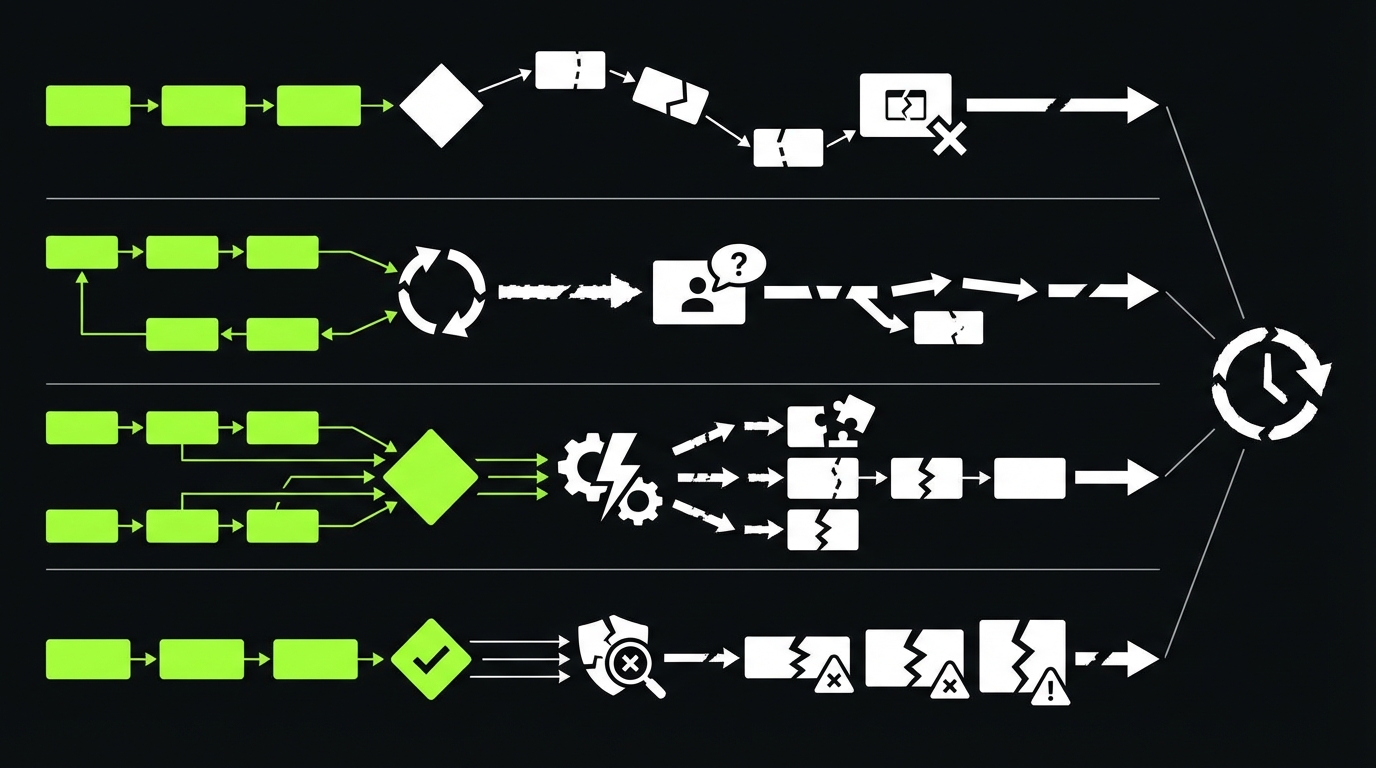
Most product timelines fail in the same few places. The symptoms look different, but the mechanics are repeatable.
Common causes:
- Invisible dependencies: legal review, data access, vendor approvals, app store review
- Late integration: teams build in parallel, then discover mismatched assumptions
- Slow feedback: stakeholders review weekly, but the team ships daily
- Unknown unknowns: AI behavior, performance, security, and edge cases show up late
- Scope drift: small additions that quietly add weeks
Key stat: In our experience, timeline accuracy improves the most when teams track dependency lead time, not just dev effort. If you are not measuring that yet, start with a simple log.
The planning trap: effort is not duration
Effort is how many hours a task takes.
Duration is how long it sits on the calendar.
Duration includes:
- Waiting for inputs
- Review cycles
- Queue time in another team
- Testing and release windows
If you plan only effort, you will undercount duration. That is where the date slips.
The second trap: milestones without acceptance
A milestone like “AI assistant done” is not a milestone. It is a headline.
A milestone needs an acceptance test you can run.
Examples:
- “Checkout flow passes 20 scripted scenarios and payment provider webhooks”
- “Avatar responds in under 800 ms p95 on a stable prompt set”
- “RAG answers cite sources and hit >98% accuracy on a labeled dataset”
Insight: A milestone without an acceptance test becomes a negotiation later. Negotiations take time you did not plan.
The critical path is usually not coding
In many product teams, the critical path is one of these:
- Data readiness (schemas, access, quality)
- Security and compliance sign off
- Integration with a third party API
- Mobile release gates
- Content and copy approvals
If you treat those as “non dev tasks,” you will schedule them last. Then they become the only thing that matters.
Build a timeline that survives delivery
_> A repeatable flow for product teams
→ Scroll to see all steps
Critical path, explained like you ship software
Critical path is the longest chain of dependent work that determines the finish date.
It is not the hardest work. It is not the most important work. It is simply what you cannot delay without delaying the launch.
The practical version for product teams:
- List the deliverables that define “done”
- List what each deliverable depends on
- Connect dependencies into chains
- Find the longest chain
- Protect it from scope and interruptions
How to find the critical path fast
Use a whiteboard or a doc. Keep it ugly. Speed matters.
Write each deliverable as a card. Then add dependency cards.
- Deliverables: onboarding, payments, admin, analytics, AI assistant, etc.
- Dependencies: vendor keys, data export, legal copy, design approval, infra provisioning
Then ask one question:
- “If this slips by a week, does the launch slip by a week?”
If yes, it is on the critical path.
Insight: Teams waste weeks optimizing tasks that are not on the critical path. It feels productive. It does not move the date.
Critical path anti patterns
Watch for these.
- Parallel fantasy: “Frontend and backend can finish independently.” They cannot.
- Integration at the end: “We will connect it in week 10.” That is how week 10 becomes week 14.
- Single milestone thinking: one big “beta” milestone hides the chain.
A simple dependency table
Use this to make lead times visible.
| Dependency | Owner | Lead time guess | Earliest start | Risk note |
|---|---|---|---|---|
| Payment provider approval | Biz ops | 10 | Week 1 | Can stall on compliance questions |
| Data export from legacy | Data team | 15 | Week 1 | Unknown field quality |
| App store review | Mobile | 7 | Week 6 | Rejections add iteration |
| Security review | Security | 5 | Week 4 | Needs threat model and evidence |
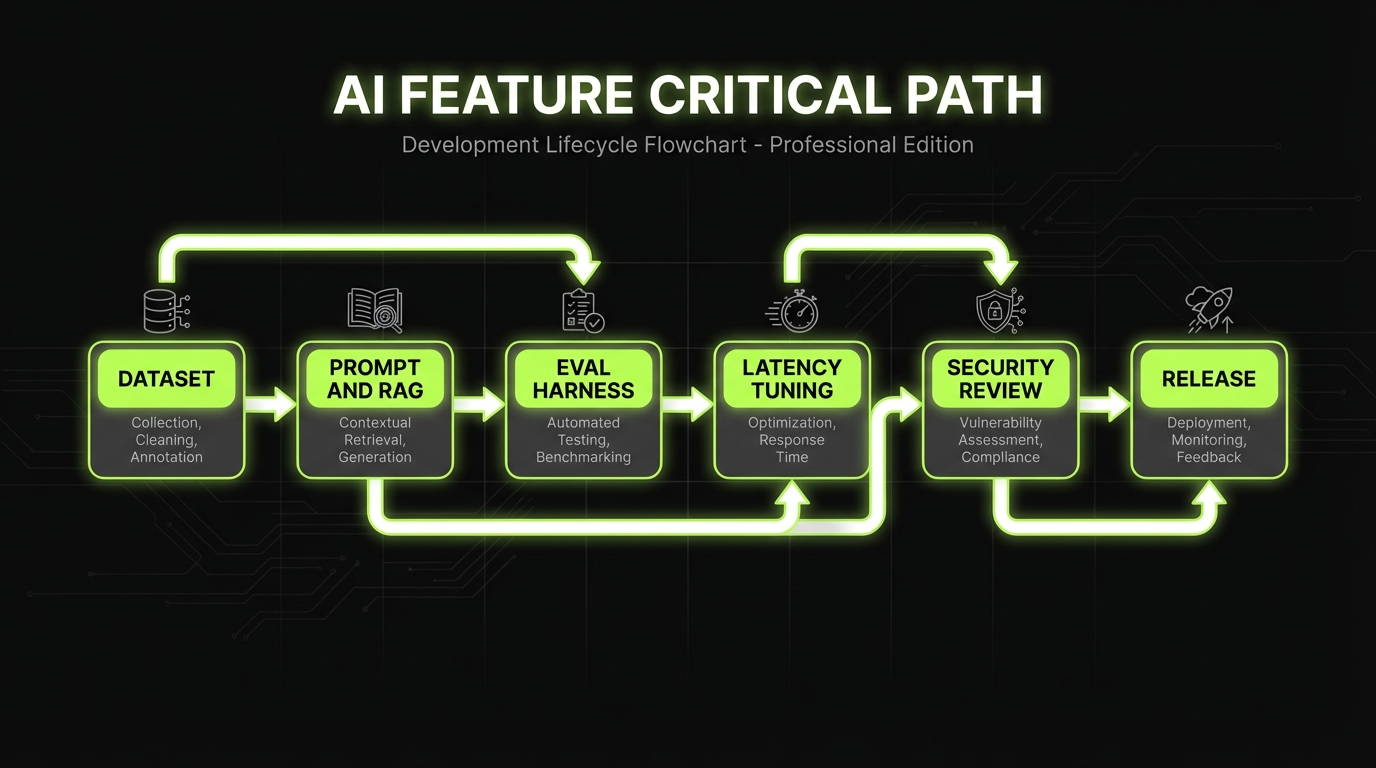
Critical path for AI features
AI changes what blocks you.
The critical path often includes:
- Creating a labeled evaluation dataset
- Defining quality gates (accuracy, refusal, latency)
- Running safety checks and drift monitoring plans
This is why “demo in week 4” is easy, and “production ready in week 12” is hard.
A quick rule for scope changes
When scope changes, do not debate it in the abstract.
Ask:
- Does it touch the critical path chain?
- Does it add a new dependency?
- Does it change acceptance criteria?
If any answer is yes, the date is at risk. Say it out loud immediately.
Critical path first
Make the chain visible
Name dependencies, owners, and lead times so the finish date has a real driver.
Buffers on purpose
Uncertainty is not free
Keep buffers explicit and tied to risks so you can manage burn, not hide it.
Quality gates early
Less rework late
Define acceptance tests, performance targets, and AI evaluation before you scale scope.
Buffers that do not lie
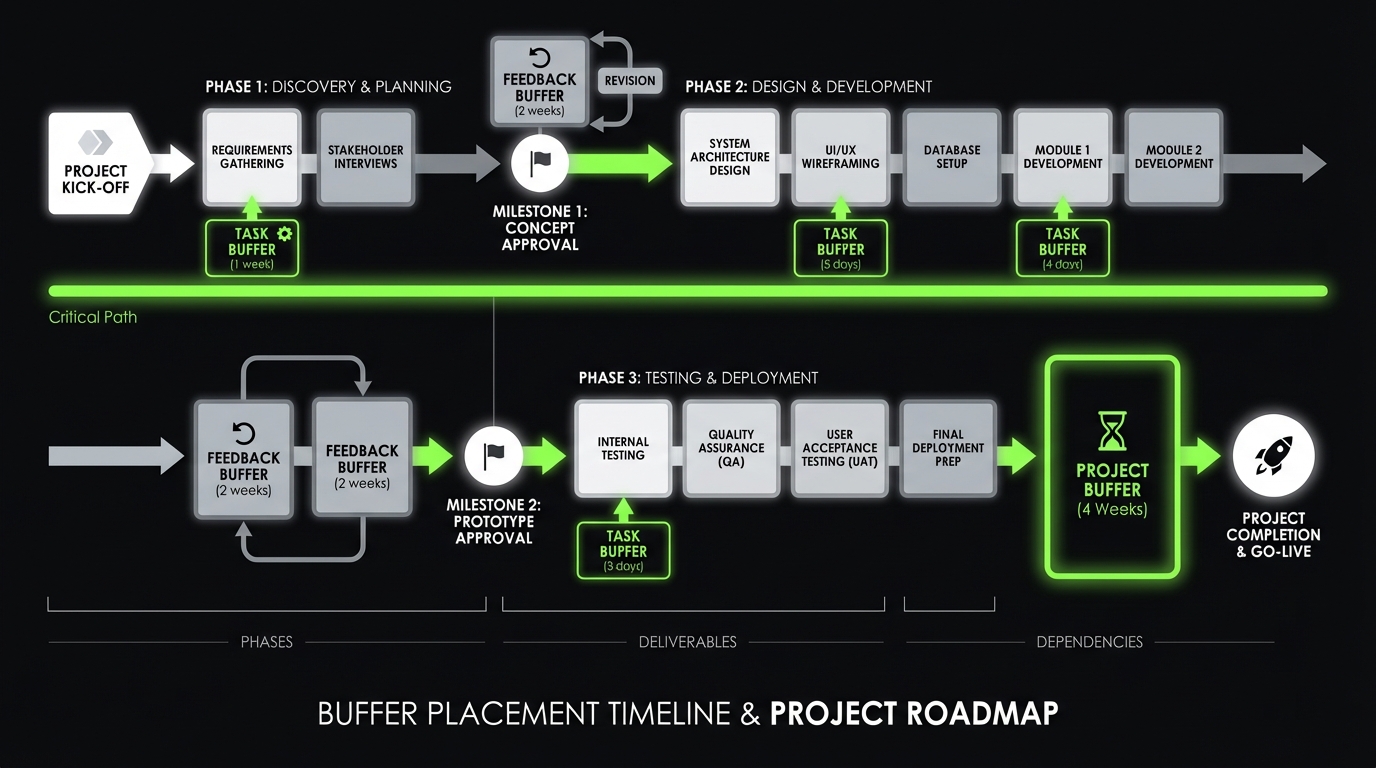
Buffers are not padding. They are planned capacity for uncertainty.
If you do not plan buffers, you still pay for uncertainty. You just pay later, with stress.
The three buffer types
You need all three.
- Task buffer: for tasks with known variability (integration, performance tuning)
- Project buffer: for unknown unknowns that will show up somewhere
- Feedback buffer: for stakeholder review cycles and decision latency
Insight: Most teams only plan task buffers. Then feedback becomes the hidden critical path.
A buffer model that works
A simple approach:
- Tag work items as Low, Medium, High uncertainty
- Add explicit buffer time per tag
- Keep buffers visible as their own line items
Example buffer policy (adjust to your context):
- Low: +10%
- Medium: +20%
- High: +35%
Do not hide this inside estimates. Put buffers on the timeline.
What to measure so buffers stay honest
If you want buffers to improve accuracy over time, track:
- Planned vs actual duration per uncertainty tag
- Number of review cycles per milestone
- Defect escape rate (bugs found after release)
- For AI: accuracy on a stable dataset, refusal rate, and p95 latency
Key stat: For AI features, we have shipped systems where evaluation accuracy targets exceeded 98% on a defined dataset. The point is not the number. The point is that the dataset and the gate were defined early.
When buffers become a smell
Buffers fail when they become a place to hide.
Red flags:
- Buffers are constant, regardless of uncertainty
- Buffers get consumed early, then the plan pretends nothing happened
- Nobody can explain what risks the buffer covers
Mitigation:
- Tie buffer to a specific risk register
- Review buffer burn weekly
- Convert unknowns into tasks as soon as you learn them
What you get when you do this well
Fewer surprise delays
Dependencies and review cycles stop being invisible work that appears at the end.
Cleaner scope decisions
Changes are evaluated against the critical path, not debated as opinions.
Faster learning
Thin end to end slices surface integration risks early, when they are cheap to fix.
Better stakeholder trust
You can explain what drives the date, what is at risk, and what you will do next.
Delivery patterns that protect the date
Critical path and buffers are planning tools. Delivery patterns are execution tools.
Here are the patterns that keep timelines stable.
Pattern 1: Prove the path early
Do the riskiest, most dependency heavy slice first.
Not a prototype that only works on your laptop.
A thin, production shaped slice:
- Auth works end to end
- One core workflow works end to end
- Logging and monitoring exist
- A release path exists
Pattern 2: Tight feedback loops
Weekly demos are fine.
Daily decisions are better.
If stakeholders cannot meet daily, use async reviews with strict rules:
- One owner per decision
- 24 hour SLA for feedback
- If no feedback, it is approved
Pattern 3: Quality gates, not hero QA
Quality is a timeline tool.
If you find bugs late, you extend the critical path.
Set gates per milestone:
- Performance: p95 latency target
- Reliability: error budget and alerting
- Security: threat model and evidence
- AI behavior: evaluation dataset and judge criteria
Insight: QA is not a phase. It is a set of gates that prevent rework from landing on the critical path.
Pattern 4: Integration by default
Integrate every day. Even if it hurts.
Avoid the week 8 surprise.
Practical habits:
- Feature flags for incomplete work
- Trunk based development
- One staging environment with predictable data
- Contract tests for third party APIs
A small code example: definition of done as a checklist
Keep this near the backlog. Make it boring.
Milestone Done Checklist
1. Acceptance tests written and passing
2. Monitoring added (logs, key metrics, alerts)
3. Security checks completed (OWASP basics plus app specific risks)
4. Performance measured (p95 latency recorded)
5. Release plan confirmed (who, when, rollback)
6. Stakeholder sign off captured (link to decision)
Compare delivery approaches
| Approach | What it optimizes | Where it fails | Best use |
|---|---|---|---|
| Date first | Predictability | Scope gets cut late | Fixed launch events, external deadlines |
| Scope first | Feature completeness | Date slips quietly | Internal tools, flexible launches |
| Learning first | Fast validation | Hard to forecast | PoC and MVP work, new markets |
| Risk first | Fewer surprises | Feels slower early | Regulated industries, AI in production |
In reality, you mix them. The key is to pick the default and say it out loud.
Where Apptension tends to fit
When we join teams, the best outcomes happen when the internal team keeps product ownership, and we bring self directed teams that can execute across engineering, QA, and delivery operations.
It works well for:
- PoC and MVP builds with a hard demo date
- End to end delivery when internal teams are stretched
- AI features that need evaluation and QA discipline
It fails when:
- Nobody owns decisions
- The org cannot commit to feedback SLAs
- The launch definition stays fuzzy
That is not a vendor problem. It is a governance problem.
Use them for capacity planning if your team finds them useful. For the calendar, track duration drivers: dependency lead time, review latency, integration time, and release gates.
Treat evaluation as a deliverable. Create a labeled dataset, define judge criteria, set targets for accuracy and refusal, and track p95 latency. Put those gates on the timeline.
Usually near the end, after the last major integration point, so it protects the finish date. If risk is concentrated earlier, split it into smaller buffers tied to specific tasks.
Then the timeline must include feedback duration explicitly. The worst option is pretending feedback is instant and letting it become an unplanned critical path blocker.
Keep the plan at the level of deliverables, dependencies, and gates. Update weekly. If a detail does not change decisions, remove it.
Real world timelines from the field
Short timelines are possible. They are not magic. They are trade offs and discipline.
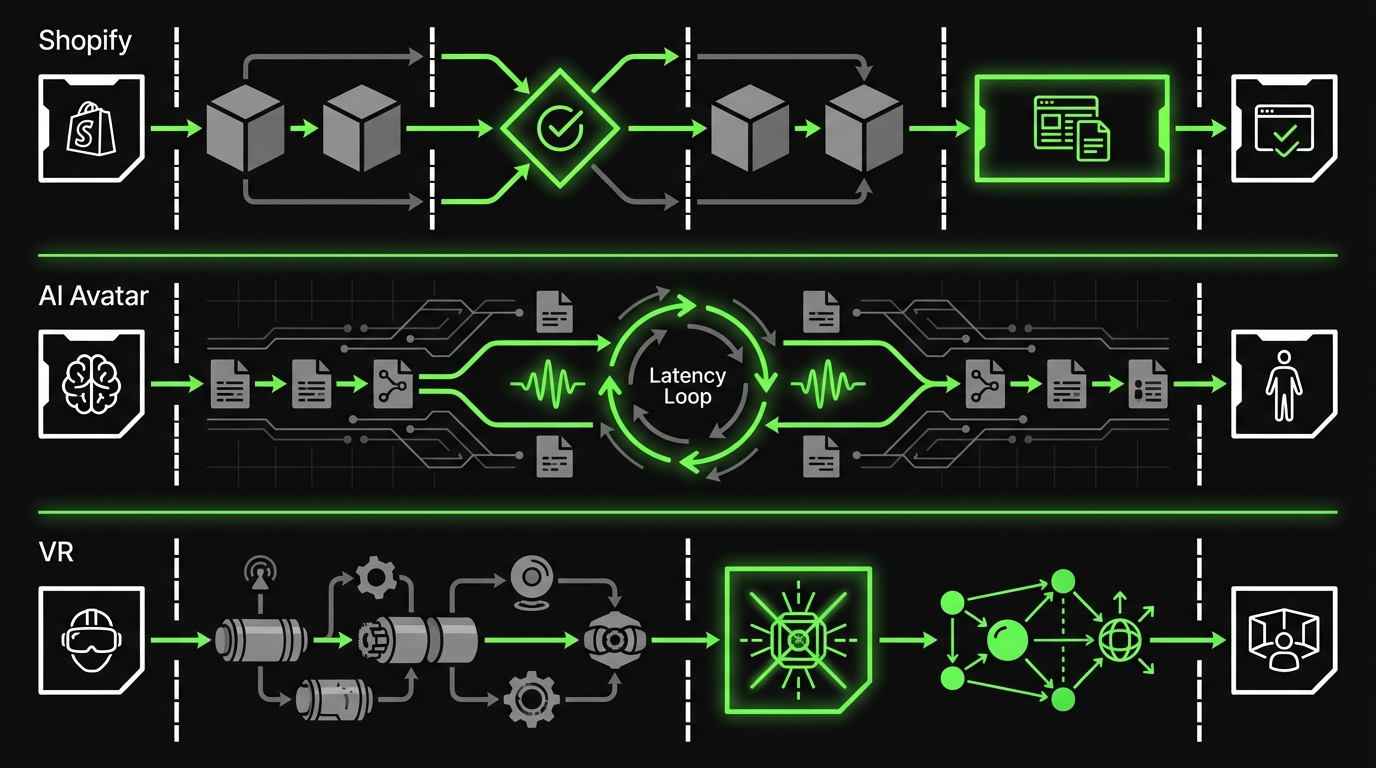
Miraflora Wagyu: luxury Shopify in 4 weeks
A luxury retail brand needed a custom Shopify store that matched a premium identity. The constraint was time. The team was distributed across time zones, which made synchronous feedback hard.
What made the timeline work:
- Clear definition of done for launch scope
- Async feedback rules to avoid waiting days for approvals
- Early integration of ecommerce essentials: checkout, shipping, analytics
What could have broken it:
- Late changes to information architecture
- Payment and shipping edge cases discovered in the last week
Example: The project shipped in 4 weeks by treating feedback latency as a first class risk, not an afterthought.
Real time AI Avatar: production shaped demo in 4 weeks
A brand experience agency wanted a conversational AI avatar that felt natural. The main risk was response latency and smooth audio streaming.
The critical path was not UI polish. It was:
- Audio input stability
- Latency tuning
- Reliable turn taking in conversation
What made the timeline work:
- Performance targets early
- A thin end to end slice first
- Iteration on the highest risk loop, not on features
Example: The team focused on response feel and latency first, because that was the only thing users would notice in the first 10 seconds.
Hyper: spatial design with motion tracked models
In spatial and VR work, the timeline risk often hides in hardware and calibration. You can build a beautiful interface and still fail if tracking drifts.
Delivery lessons that generalize:
- Prototype the hardest physical constraint early
- Treat calibration as a product feature, with acceptance tests
- Plan buffers for device setup and environment variance
Insight: Hardware adjacent software has a different critical path. Your buffer model needs to reflect that.
What to copy from these examples
Do not copy the exact timeline. Copy the mechanics.
- Define launch scope with acceptance tests
- Put the biggest risk on day 1, not week 6
- Make feedback a scheduled activity
- Track dependency lead times like you track story points
Conclusion
A timeline you can trust is not more documentation. It is better visibility.
If you want a practical starting point, do this next week:
- Write your launch definition in acceptance terms
- Map dependencies and name owners
- Identify the critical path chain
- Add explicit buffers for uncertainty and feedback
- Set quality gates per milestone, including AI evaluation if relevant
Keep it simple. Keep it visible.
Insight: The goal is not to predict the future perfectly. The goal is to see the future earlier than your risks do.
Next steps checklist
- Run a 60 minute critical path workshop with engineering, product, and QA
- Create a dependency log with lead times and owners
- Track buffer burn weekly and convert unknowns into tasks
- Measure what matters: cycle time, review latency, defect escape rate, and for AI, accuracy and p95 latency
If you do that, your timeline becomes a tool. Not a story you tell on Monday and apologize for on Friday.
If you only remember three rules
- Protect the critical path from scope and interruptions
- Plan buffers explicitly and tie them to risks
- Ship thin slices early so integration and quality do not surprise you late