Introduction
AI changed what we can build. It did not change what users need.
The biggest shift is speed and uncertainty at the same time. We can prototype flows in hours. We can also ship a feature that looks fine in a demo and falls apart with messy data, edge cases, and compliance.
In our delivery work, the teams that do well treat AI like a new kind of dependency. It is powerful. It is probabilistic. It needs monitoring. And it needs a design process that accepts that outputs will vary.
Here is a practical way to run product design in an AI enabled era. It is meant for teams shipping real product, not decks.
- What stays the same: user goals, constraints, usability, trust
- What changes: iteration speed, evaluation, and how you define “done”
- What gets harder: alignment, risk, and repeatability
A quick definition so we do not talk past each other
When I say AI enabled product design, I mean any product where:
- A model generates content, decisions, or recommendations
- The UI adapts based on inferred intent
- The system uses embeddings, search, or classification to route users
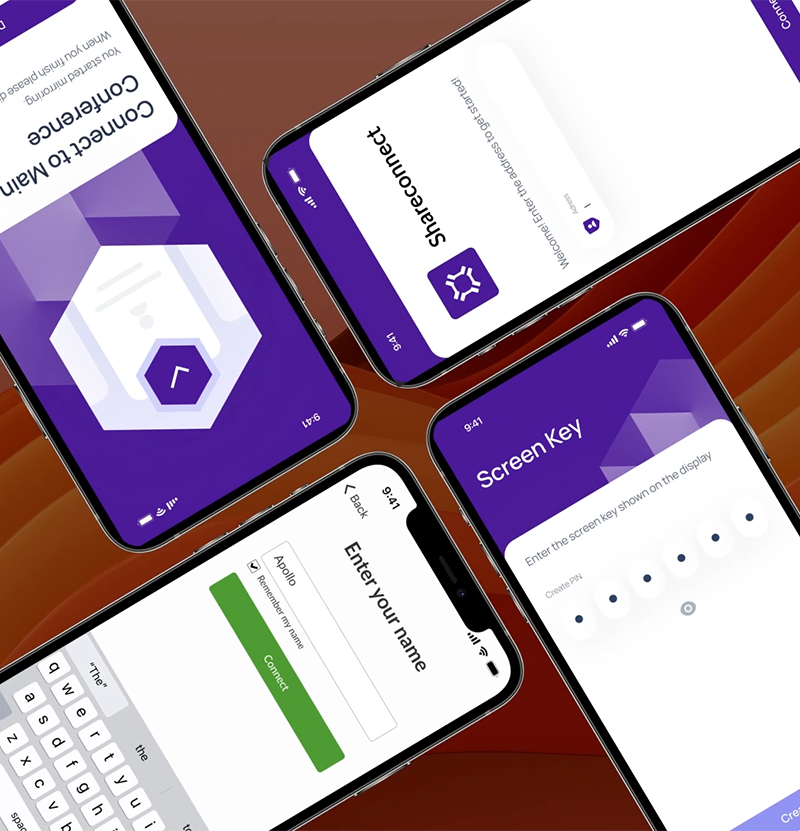
It includes chat, but it is not limited to chat. A screen recorder app with permission flows is not “AI”, yet the same design discipline applies: ambiguous states, platform constraints, and user trust. We saw that clearly when working on Mersive’s cross platform screen capturing app where permissions and platform rules shaped the UX as much as the UI did.
- Timeouts with a clear next step
- Partial results with a way to refine
- Low confidence answers with a prompt to verify
- Refusals that explain why and offer alternatives
- Escalation to human support with context carried over
- Data consent and retention reminders at the right moment
What breaks in a classic product design process
Most design processes assume the system is deterministic. Same input, same output.
AI breaks that assumption. Not always. But often enough that users notice.
Common failure modes we see:
- The team designs for the happy path and ignores model variance
- The team ships a “smart” feature without a fallback
- Stakeholders evaluate with vibes instead of test cases
- The product has no clear boundaries for what the AI should not do
Insight: If you cannot explain what “good” looks like in plain language, you cannot evaluate an AI feature in production.
The new constraints: variance, latency, and trust
AI adds constraints you need to design around.
- Variance: two users ask the same thing and get different answers
- Latency: a 400 ms UI becomes a 4 to 12 second wait
- Trust: users assume the system is confident even when it is guessing
Design has to make those constraints visible and manageable.
The old artifacts still matter, but they need upgrades
You still need:
- User journeys
- Wireframes
- Prototypes
- Design systems
But you also need:
- Evaluation plans (what you will measure, how, and with what data)
- Guardrails (what the AI must not do, and what happens when it is unsure)
- Failure state designs (timeouts, refusals, partial results)
Key Stat: 76% of consumers get frustrated when organizations fail to deliver personalized interactions.
That stat is often used to justify personalization. The design lesson is different: if you promise “personal”, you must also handle the moments when the system is wrong without making the user feel blamed.
- Measure: correction rate, abandonment rate, and repeat usage after a wrong output
- Hypothesis: clear recovery paths reduce churn more than “more intelligence” does
Where teams lose time: alignment loops
AI makes feedback loops noisier. Stakeholders test a prototype. They see one good output. They assume it is solved.
A better pattern is to align on:
- A small set of representative tasks
- A fixed test dataset or prompt set
- A scoring rubric
This is similar to how we approach User Acceptance Testing in regulated environments. You cannot rely on ad hoc testing when many stakeholders have different priorities. You need scripts, preconditions, and expected outcomes.
- Treat AI evaluation like UAT, not like a demo
- Keep the scripts versioned
- Track failures as product bugs, not “model quirks”
_> AI design metrics worth tracking
Start simple. Make failures visible.
- Map the user job and risk level
- Draft boundaries and failure states
- Prototype the workflow with scripted outputs
- Run 8 to 12 user sessions and score with a rubric
- Decide: ship behind a flag, iterate, or drop the idea
A practical AI enabled product design process
This is the process we use when we want speed without chaos. It works for greenfield and for retrofitting AI into an existing product.
Step 1: Start with the job, not the model
Write the user job in one sentence. Then list what “success” means.
Numbered steps help here:
- Define the user job and the moment it happens
- Define the output the user needs
- Define the cost of being wrong
- Decide if AI is even the right tool
If the cost of being wrong is high, you will need stronger guardrails and maybe a human in the loop.
Step 2: Design the boundaries before the UI
Teams often start by designing the chat screen. That is backwards.
Define boundaries first:
- What inputs are allowed
- What sources the system can use
- What the system should refuse
- What the fallback is when confidence is low
Insight: The best AI UX is often a good refusal plus a fast path to a human or a simpler tool.
Step 3: Prototype the workflow, then the model behavior
You can prototype AI behavior without a model.
- Use a scripted “wizard of oz” prototype
- Use a fixed set of canned outputs
- Use a small prompt library and manually score results
This keeps design work moving while engineering validates feasibility.
Step 4: Define evaluation like you define acceptance criteria
You need a rubric.
- Accuracy (task success)
- Helpfulness (did it unblock the user)
- Safety (did it avoid restricted content)
- Consistency (does it behave similarly across variants)
- Latency (time to first useful output)
If you do not have numbers yet, treat them as hypotheses and commit to measuring them.
Step 5: Ship with observability and a rollback plan
AI features need operational design.
- Logging that is privacy safe
- Feedback capture in the UI
- Feature flags and kill switches
- Alerting on drift and spikes in failures
This is where architecture choices matter. Microservices and event driven patterns can help isolate sensitive data and scale specific parts of the system, but they also add complexity in monitoring and security. Zero trust principles become practical, not theoretical.
A simple evaluation harness example
This is not production code. It is a sketch of how teams keep evaluation honest.
# Pseudocode for a lightweight evaluation harness
Goal: keep prompts, expected outcomes, and scoring versioned

test_cases = [
  {
    "id": "refund_policy_01",
    "input": "Can I return this after 45 days?",
    "expected": "Explain 30 day policy and next steps",
    "must_not": ["invent policy", "promise refund"],
  }
]

def score(output, case):
  passed = True
  if any(bad in output.lower() for bad in case["must_not"]):
    passed = False
  # Add human scoring for helpfulness and tone
  return passed

for case in test_cases:
  output = model.generate(case["input"])
  print(case["id"], score(output, case))
You can extend this with human review, golden answers, and regression runs on every prompt change.
Design checklist for AI flows
Use this when reviewing screens and prototypes.
- Does the user know what the system is doing right now?
- Can the user correct the system quickly?
- Is there a clear “undo” for destructive actions?
- Are sources visible when that matters?
- Is there a safe fallback when the AI is unsure?
- Are we explicit about data use and retention?
Callout: If the user cannot tell the difference between “loading”, “thinking”, and “stuck”, support tickets will teach them the hard way.
- Faster alignment because “good” is defined
- Fewer late stage debates because test cases are shared
- Safer launches because fallbacks exist
- Better prioritization because you can measure impact
- Easier compliance conversations because boundaries are explicit
What to measure (and what to stop guessing about)
AI features invite hand waving. “It feels better.” “It sounds smarter.” That is not enough.
You need product metrics and model quality metrics. Both.
A simple metrics map
- Product: activation, retention, task completion, time to value
- AI quality: groundedness, error rate, refusal rate, escalation rate
- Ops: latency percentiles, cost per request, incident rate
If you do not have baseline numbers, measure the non AI flow first.
A comparison table you can use in planning
| Decision | When it works | What fails | What to measure |
|---|---|---|---|
| Chat first UI | Exploratory tasks, support, ideation | Users do not know what to ask, hard to scan | Prompt to success rate, time to first useful output |
| Form plus AI assist | Structured workflows, compliance heavy domains | Feels slower, more steps | Completion rate, error rate, drop off per step |
| AI suggestions in context | Editing, review, recommendations | Overtrust, silent errors | Accept rate, edit distance, correction rate |
| Full automation | High volume, low risk tasks | One bad output causes damage | Escalation rate, rollback frequency, incident severity |
Key Stat: If you cannot track correction and escalation, you are blind to silent failures.
That is not a published stat. It is an observation. The way to validate it is simple:
- Instrument “user edited output” events
- Track how often users re run the same request
- Track support tickets tagged to AI outcomes
Borrow a page from UAT
For AI, UAT is not just a final gate. It is an ongoing discipline.
- Write UAT scripts for top tasks
- Include preconditions and expected outcomes
- Re run scripts after prompt changes, model updates, or data pipeline changes
This is the same mindset we use when multiple stakeholders and compliance requirements collide. Scripts reduce arguments. They also reduce regressions.
Metrics we like because they force clarity
These metrics are boring. That is why they work.
- Task success rate: did the user finish the job?
- Time to first useful output: not first token, first useful step
- Correction rate: how often the user edits or retries
- Escalation rate: how often the system needs a human
- Refusal quality: are refusals helpful or dead ends?
If you want one metric that catches a lot of issues early, start with correction rate. It is a proxy for trust.
Boundaries first
Refusals and fallbacks
Define what the system should not do before you design the UI. Users need safe exits.
Evaluation as a habit
Rubrics and scripts
Treat model changes like product changes. Re run test cases the same way you run UAT.
Operational UX
Flags, logs, monitoring
Design for drift, latency spikes, and partial outages. Plan how you will turn it off.
Examples from delivery: what we changed and why
Concrete examples help because AI design can get abstract fast.
Miraflora Wagyu: speed, async feedback, and crisp decisions
We delivered a custom Shopify experience for Miraflora Wagyu in 4 weeks. The interesting part was not the pixels. It was the process.
The client team was spread across time zones, from Hawaii to Germany. Synchronous feedback was hard. Early on, communication was mostly async.
What worked:
- Tight weekly decision points instead of endless async threads
- Clear definitions of what needed approval (and what did not)
- Small prototypes that answered one question at a time
What did not work at first:
- Long Slack discussions with no owner
- Feedback that mixed brand preferences with functional requirements
Mitigation we used:
- A single source of truth for decisions
- Short Loom style walkthroughs for context
- A structured review checklist
Example: When time zones make live workshops unrealistic, the process has to carry the weight. Async can work, but only with crisp decision rules.
Mersive: platform constraints shape the UX more than opinions do
For Mersive, we redesigned a cross platform screen capturing app in 2 months and worked through strict permissions on Android and iOS.
This is not an AI case study, but it is a good reminder: constraints win.
- Android screen and audio recording permissions are not negotiable
- iOS has its own rules and friction
- App store requirements can force UX changes late
Now map that to AI:
- Privacy and data use constraints are not negotiable
- Model limitations are not negotiable
- Regulated industry requirements are not negotiable
So we design the “hard parts” first. Permissions screens. Data consent. Refusal states. Audit logs.
Hyper: designing for new interaction models
Hyper is a mixed reality platform for spatial design. The core challenge was intuitive tools for spatial designers and architects.
AI enabled design in new interfaces has an extra problem: users do not have established mental models. You cannot hide complexity behind “smart”.
What helped:
- Clear mode indicators
- Undo and safe exploration
- Progressive disclosure instead of dumping capability upfront
The AI parallel is obvious. If users do not understand the system’s boundaries, they will either overtrust it or abandon it.
The common thread across these projects
Different domains. Same pattern.
- Make constraints explicit early
- Reduce ambiguity in decisions
- Prototype the riskiest part first
AI adds more uncertainty. That makes the basics more important, not less.
- Do we need chat? Often no. Start with AI assistance inside existing flows.
- Can we skip user research because the model is “smart”? No. You still need to learn user goals and constraints.
- Is prompt tuning a design task or an engineering task? Both. Treat prompts like product logic with version control.
- When do we need a human in the loop? When the cost of being wrong is high or the system cannot explain its sources.
- How do we avoid shipping a demo feature? Add evaluation scripts and instrumentation before launch.
Conclusion
AI enabled product design is not “design plus prompts”. It is design plus evaluation, guardrails, and operations.
If you want a simple way to start, do this next week:
- Pick one user job where AI might help
- Write a boundary list: allowed, not allowed, fallback
- Create 20 test cases and score them weekly
- Add instrumentation for correction and escalation
- Ship behind a feature flag
And keep your expectations grounded.
- AI can speed up workflows
- AI can also create new failure modes that look like product bugs
- Users will forgive a system that is honest and recoverable
- Users will not forgive a system that is confident and wrong
Final thought: The goal is not to make the product sound smart. The goal is to help users finish work with fewer surprises.