Introduction
Teams want one thing: connect LLM to tools without building a new brittle integration every quarter.
Model Context Protocol (MCP) is a strong step in that direction. It gives you a standard way to expose tools and data to models through an MCP server, with explicit permissions and predictable contracts.
This guide is for engineers and platform teams who need production ready LLM integrations across CRMs, ticketing, docs, code, and warehouses.
What you will get:
- A clear mental model of Model Context Protocol concepts: servers, tools, resources, permissions
- Integration patterns that work in enterprise environments
- Environment separation: dev, staging, production
- Auth and secrets practices: rotation, scoping, auditability
- A testing strategy, including contract tests for tools
Proof point: In our delivery work across 360+ projects since 2012, the integration failures are rarely “LLM quality.” They are usually permissions, missing audit trails, and tool contracts that drift over time.
When MCP is the right move
MCP shines when you have more than one tool and more than one team.
Use it when:
- You need a standard interface across many systems
- You want permissioned access, not “one API key to rule them all”
- You expect tools to evolve and want contracts that can be tested
Be cautious when:
- You only have one internal API and it is stable
- Latency budgets are extremely tight and every hop matters
- Your security model cannot tolerate any dynamic tool invocation
Insight: MCP does not remove integration work. It moves it into a place where you can standardize, test, and audit it.
_> Delivery proof points
What we optimize for in production integrations
A practical MCP rollout
_> Ship a safe baseline before you add more tools
→ Scroll to see all steps
MCP concepts that matter
Most MCP debates get stuck on syntax. The practical part is the operating model: who can call what, with which data, and how you prove it later.
Key building blocks:
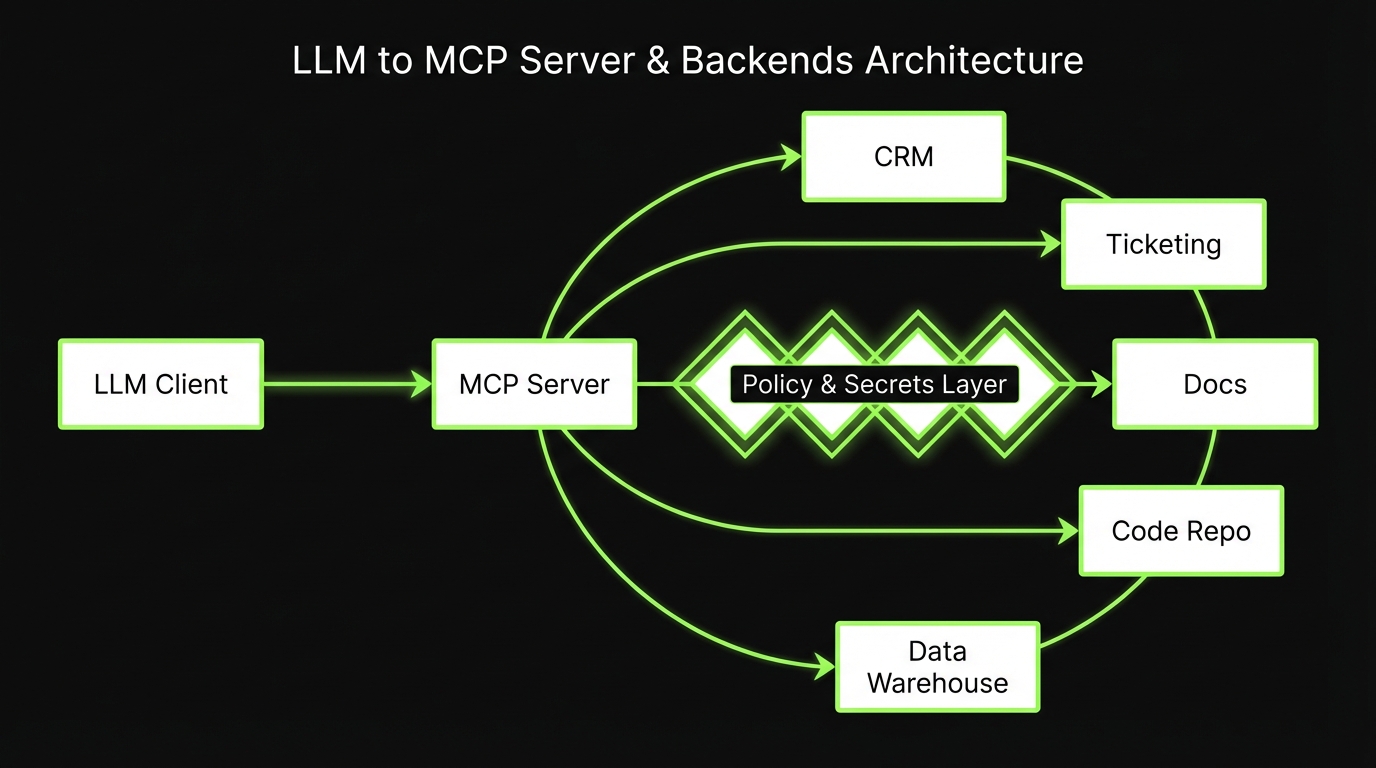
- MCP server: the runtime that exposes tools and resources to clients
- Tools: callable actions with input schemas and typed outputs
- Resources: read only or fetchable context like documents, records, or query results
- Permissions: the policy layer that decides what a given client or user can access
Key idea: Treat every tool like a public API. If it is not versioned, scoped, and logged, it will break at the worst time.
Servers, tools, resources in plain terms
A useful way to explain MCP internally:
- The MCP server is your “tool gateway.” It is not the model. It is the boundary.
- A tool is a function you are willing to run on behalf of a user.
- A resource is data you are willing to reveal, usually read oriented.
Practical examples:
- Tool:
create_ticketin your ticketing system - Tool:
update_crm_opportunity_stagein your CRM - Resource:
doc://handbook/oncallfrom your docs store - Resource:
warehouse://revenue/dailyfrom your data warehouse
Permissions are the product
If you only implement one thing well, make it permissions.
A workable permissions model usually includes:
- Identity binding: every call maps to a user or service principal
- Tool scopes: allow lists per tool, per environment
- Resource scoping: row level and document level controls
- Purpose limits: “read only” modes for some agents
- Auditability: logs you can answer questions with
Common failure mode:
- You ship “admin access for now” to unblock a demo
- That admin token becomes the integration token
- Six months later, nobody can explain why the model can delete customer records
Mitigation: start with read only resources and a small tool set. Expand after you have logs and contract tests.
MCP server capabilities to standardize
_> The boring parts that keep systems stable
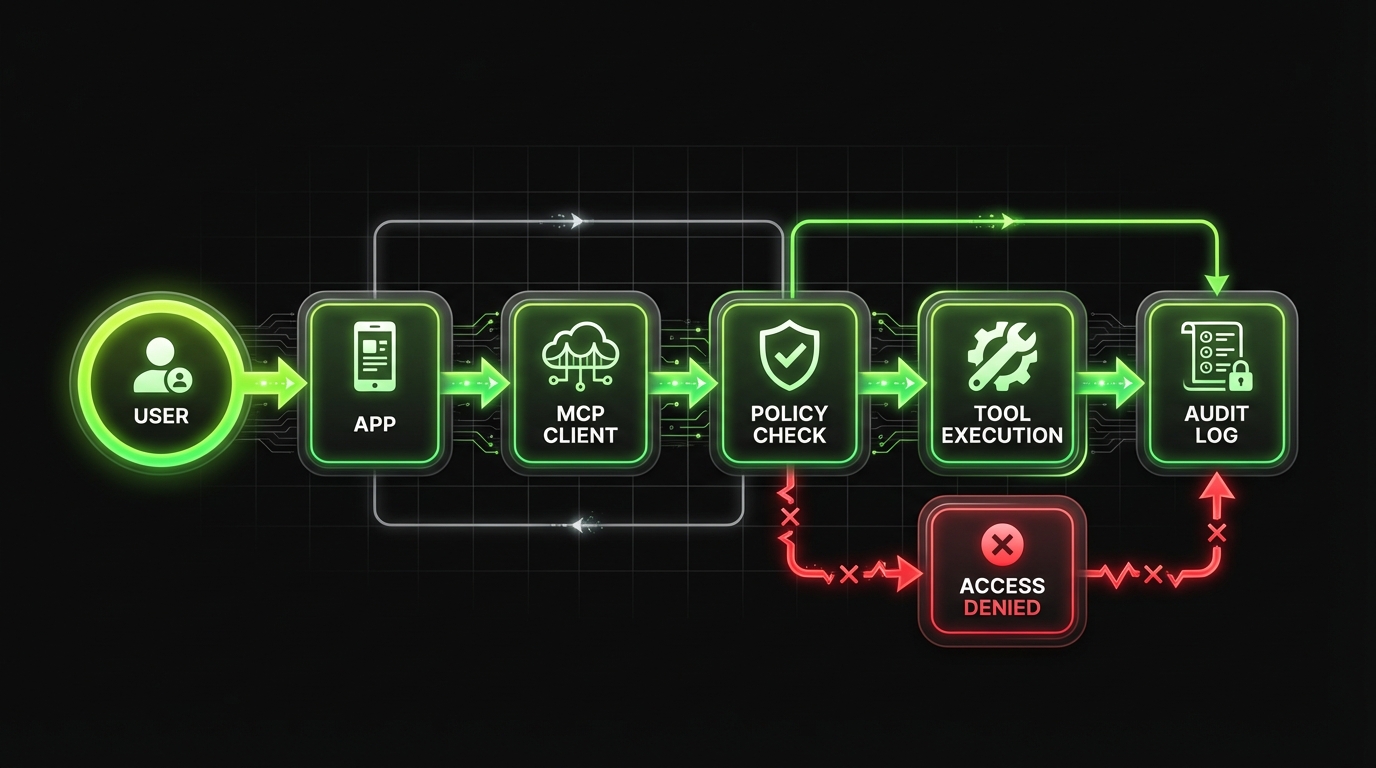
Policy enforcement
Central allow lists for tools and resources, with deny by default behavior.
Identity binding
Every tool call maps to a user or service principal for auditability.
Schema validation
Reject invalid inputs early. Return typed errors the agent can handle.
Rate limiting and quotas
Per tool limits prevent runaway loops and protect upstream systems.
Observability
Request IDs, structured logs, and error codes that support incident response.
Versioning
Tool contract versions let you evolve safely without breaking clients.
Integration patterns by system
Most MCP integration work is not about MCP. It is about mapping messy systems to safe, minimal tools.
Below are patterns that hold up across teams.

CRMs: Salesforce, HubSpot, Dynamics
CRMs are permission heavy and full of side effects. Keep your first tools boring.
Good starter tools:
search_accountswith strict filters and paginationget_account_summaryreturning a small, stable shapecreate_noteorlog_activityinstead of editing core objects
Avoid early:
- “Update anything” tools
- Bulk updates
- Tools that accept free form field names
What to measure (hypothesis):
- Reduction in time to prep account briefs
- Fewer manual copy paste errors
- Median tool call latency and failure rate
Ticketing: Jira, Linear, ServiceNow, Zendesk
Ticketing is where LLMs can save real time, but only if your contract is strict.
Patterns that work:
- Provide a template tool:
create_ticket_from_template - Separate “draft” from “create”:
draft_ticketthencreate_ticket - Enforce required fields with schema validation
Failure mode:
- The model creates tickets with vague titles and no acceptance criteria
Mitigation:
- Add a
validate_tickettool that returns structured issues - Require a short checklist in the tool input
Insight: The best ticketing tools do not write more tickets. They write fewer, clearer tickets.
Docs and knowledge bases: Notion, Confluence, Google Drive
Docs are high value and high risk. The risk is data exposure, not tool execution.
Patterns that work:
- Prefer resources for read access, not tools that dump entire spaces
- Use document level ACL checks at fetch time
- Return excerpts with citations, not full documents by default
A simple resource strategy:
resource://doc/{id}returns sections, headings, and a short excerptresource://search?q=returns IDs and snippets
What fails:
- “Search everything” with no tenant or team scope
- Long context dumps that blow token budgets
Code and repos: GitHub, GitLab, Bitbucket
Code tools can be useful, but they can also create expensive mess.
Safe starting set:
list_changed_filesfor a PRget_filewith size limitssearch_codescoped to a repo and branch
Be strict about write actions:
- If you allow
create_pr, require a linked ticket and a diff size limit - Separate “generate patch” from “open PR”
This matches what we see with AI coding tools in shared repos: early wins are real, but without guardrails you get broken builds and cleanup weeks later.
Example: In our internal and client delivery work, the moment AI touches a shared repository it becomes a systems problem: CI, review, security, and ownership.
Data warehouses: Snowflake, BigQuery, Redshift
Warehouse access is where you either earn trust fast or lose it.
Patterns that work:
- Provide a
run_querytool that only targets approved schemas - Require a
dry_runmode that returns estimated cost and row counts - Return aggregates by default. Gate raw row access.
Hard rules to consider:
- No
SELECT * - Maximum rows per query
- Timeouts and concurrency caps
- Query logging tied to user identity
Key stat to track: percent of queries that require manual intervention. If it is high, your tool contract is too flexible.
Environments, auth, and secrets
If you want enterprise grade MCP deployments, treat it like any other integration platform.
That means strict environment separation, scoped credentials, and audit trails you can hand to security.
Checklist for day one:
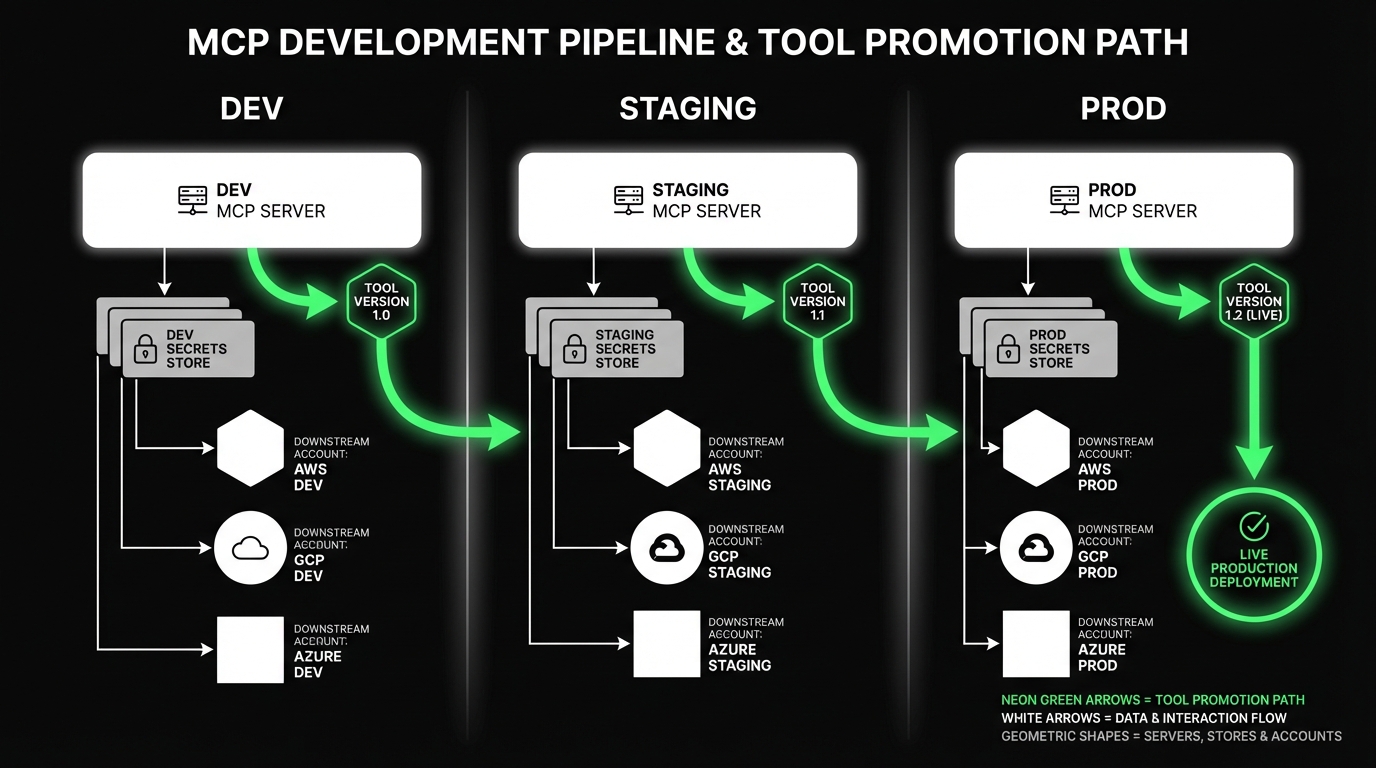
- Separate MCP servers for dev, staging, production
- Separate tool credentials per environment
- Centralized logging with request IDs
- A clear rotation and revocation process
Insight: Most incidents are not “the model did something weird.” They are “a token lived too long” or “staging creds hit production.”
Environment separation that actually holds
A practical setup:
Dev MCP server
- Uses sandbox accounts for CRM and ticketing
- Allows verbose logging
- Allows mock tools for early development
Staging MCP server
- Mirrors production permissions
- Uses staging datasets and staging OAuth apps
- Runs contract tests on every deploy
Production MCP server
- Minimal scopes
- Strict rate limits
- Full audit logging
Common failure mode:
- One MCP server with “environment flags”
Mitigation:
- Separate deployments. Separate credentials. Separate allow lists.
Auth and secrets: rotation, scoping, auditability
You need three properties at the same time:
- Rotation: keys and tokens can be replaced without downtime
- Scoping: each tool gets the smallest set of permissions
- Auditability: you can answer who accessed what and why
Concrete practices:
- Prefer OAuth with short lived tokens where possible
- Use a secrets manager, not environment variables in CI logs
- Bind tool calls to a user identity, not a shared service account
- Log: tool name, input hash, output hash, user, timestamp, request ID
Rotation playbook (simple and boring):
- Issue new credential with same scopes
- Deploy MCP server supporting both credentials
- Flip traffic to new credential
- Revoke old credential
- Verify logs show only new credential usage
Security note: If you cannot bind calls to a user, treat the integration as a privileged system and tighten scopes even further.
What you get when MCP is done right
_> Outcomes you can measure
Faster onboarding for new tools
A standard contract and policy layer reduces one off integration work. Measure time from request to first working tool call.
Lower incident rates
Typed errors, idempotency, and contract tests reduce noisy failures. Measure failures by error code and mean time to recover.
Clear audit trails
Identity bound logs support security reviews and investigations. Measure percent of tool calls with complete audit fields.
Safer enterprise enablement
Scoped permissions and environment separation reduce blast radius. Measure how often staging and production credentials are mixed, ideally never.
Tool contracts, errors, and testing
If your tool schemas are loose, your incident queue will be busy.
The goal is predictable behavior under:
- Invalid inputs
- Permission denials
- Upstream outages
- Partial data
This is where contract tests for tools pay for themselves. They catch drift when a CRM field changes, a ticketing workflow adds a required field, or a warehouse view is renamed.
Example: We use the same mindset as with AI coding adoption. Once automation touches shared systems, you need guardrails: CI, tests, review, and ownership.
Example tool contract and error pattern
Keep contracts small. Return typed errors. Make retries safe.
{
  "name": "create_ticket",
  "description": "Create a ticket in the issue tracker for a specific project.",
  "input_schema": {
    "type": "object",
    "required": ["project_key", "title", "description", "priority"],
    "properties": {
      "project_key": {
        "type": "string"
      },
      "title": {
        "type": "string",
        "minLength": 10,
        "maxLength": 120
      },
      "description": {
        "type": "string",
        "minLength": 50
      },
      "priority": {
        "type": "string",
        "enum": ["P0", "P1", "P2", "P3"]
      },
      "labels": {
        "type": "array",
        "items": {
          "type": "string"
        },
        "maxItems": 10
      },
      "idempotency_key": {
        "type": "string"
      }
    }
  },
  "output_schema": {
    "type": "object",
    "required": ["status"],
    "properties": {
      "status": {
        "type": "string",
        "enum": ["ok", "error"]
      },
      "ticket_id": {
        "type": "string"
      },
      "url": {
        "type": "string"
      },
      "error": {
        "type": "object",
        "properties": {
          "code": {
            "type": "string",
            "enum": [
              "VALIDATION_ERROR",
              "PERMISSION_DENIED",
              "RATE_LIMITED",
              "UPSTREAM_TIMEOUT",
              "UPSTREAM_UNAVAILABLE",
              "CONFLICT"
            ]
          },
          "message": {
            "type": "string"
          },
          "retryable": {
            "type": "boolean"
          },
          "details": {
            "type": "object"
          }
        }
      }
    }
  }
}
Error handling rules that reduce pager noise:
- Never return free form error strings only. Always return a code.
- Mark retryable errors explicitly.
- Use
idempotency_keyfor any create or update. - Treat
PERMISSION_DENIEDas a product signal, not an exception.
Insight: Most “LLM went rogue” stories are actually “tool returned ambiguous errors and the agent guessed.”
Contract tests for tools
Contract tests sit between unit tests and full end to end agent tests.
What to test per tool:
Schema compliance
- Valid inputs succeed
- Invalid inputs return
VALIDATION_ERROR
Permission behavior
- Calls without scope return
PERMISSION_DENIED
- Calls without scope return
Upstream drift
- Required fields still exist
- Response mapping still matches the output schema
Idempotency
- Same
idempotency_keydoes not create duplicates
- Same
A practical CI approach:
- Run contract tests on staging against staging dependencies
- Run a smoke subset on production with read only tools
- Fail the deploy if a contract test breaks
What to measure:
- Tool success rate
- Mean time to detect contract drift
- Percent of failures by error code
Start with one per environment, then split by domain when ownership or compliance requires it. Example: separate servers for customer data vs engineering tools.
Usually no. Prefer warehouse views and approved schemas. Add dry run and row limits. Treat raw access as a privileged workflow.
Treat docs as untrusted input. Use resource scoping, strip executable instructions, and keep tool permissions tight. The model can read text, but it should not gain new privileges from it.
A contract test that validates schema compliance and permission denials. It catches the most common breakages early.
Conclusion
MCP is a standard, not a shortcut. You still need to design tools, permissions, and tests like you mean it.
If you want a simple path to a production ready baseline, focus on three things:
- Minimum viable toolset with strict schemas and idempotency
- Security by default: scoped creds, rotation, audit logs
- Contract tests that catch drift before users do
Next steps you can do this week:
- List your top 10 user tasks. Map each to a tool or resource.
- Cut that list to 5. Ship those with strict permissions.
- Add contract tests for each tool. Run them in staging on every deploy.
Final thought: The fastest teams are not the ones with the most tools. They are the ones with the smallest toolset they can trust.