Introduction
Agentic AI demos are cheap. Shipping AI agents in production is not.
The difference is boring work: boundaries, permissions, approval gates, and a rollout plan that assumes the agent will fail in new and creative ways.
In our delivery work, we see the same pattern across products. Teams get value fast when they start with a narrow workflow, instrument it, and ship behind guardrails. The teams that start with “make it autonomous” usually end up with a brittle system and a nervous ops team.
This guide is for product and engineering leaders building enterprise AI agents. It focuses on what holds up in production, not what looks good in a screen recording.
You’ll get:
- Practical agent workflow architecture patterns
- Guardrails for tool access and human approvals
- Failure modes you can actually test
- Rollout stages from pilot to scale
- Templates: risk register, release checklist, KPI set
Proof point: Apptension has delivered 360+ software projects across industries. The common thread in successful AI delivery is not model choice. It is scope control plus measurement.
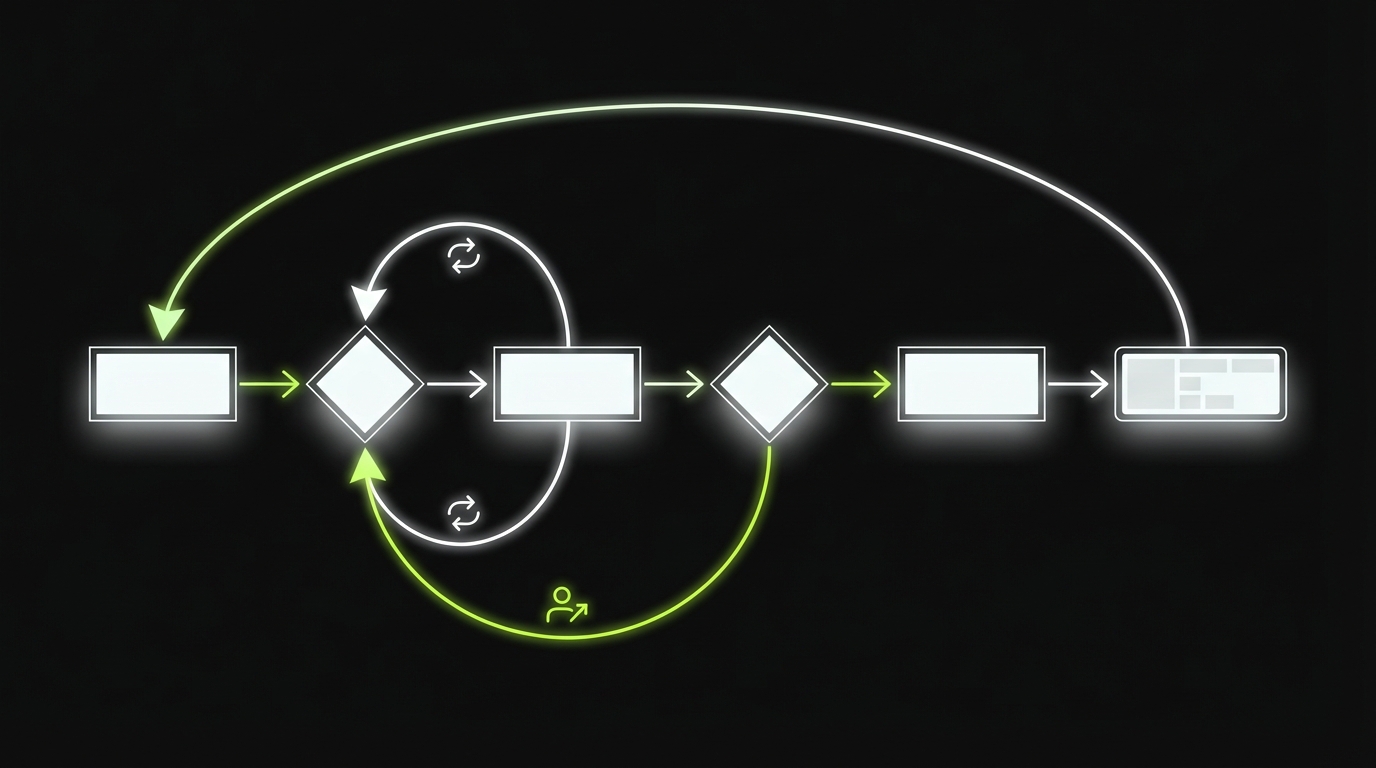
What we mean by agentic AI
For this article, agentic AI means a system that can:
- Interpret a goal
- Plan steps
- Use tools (APIs, databases, internal systems)
- Produce an outcome without a human doing each step
It does not mean:
- A chatbot that only answers questions
- A batch job that runs a fixed script
The moment an agent can write data, trigger payments, change permissions, or contact customers, you are in production engineering territory.
_> Delivery signals that matter
What we track before we scale an agent workflow
What breaks in production
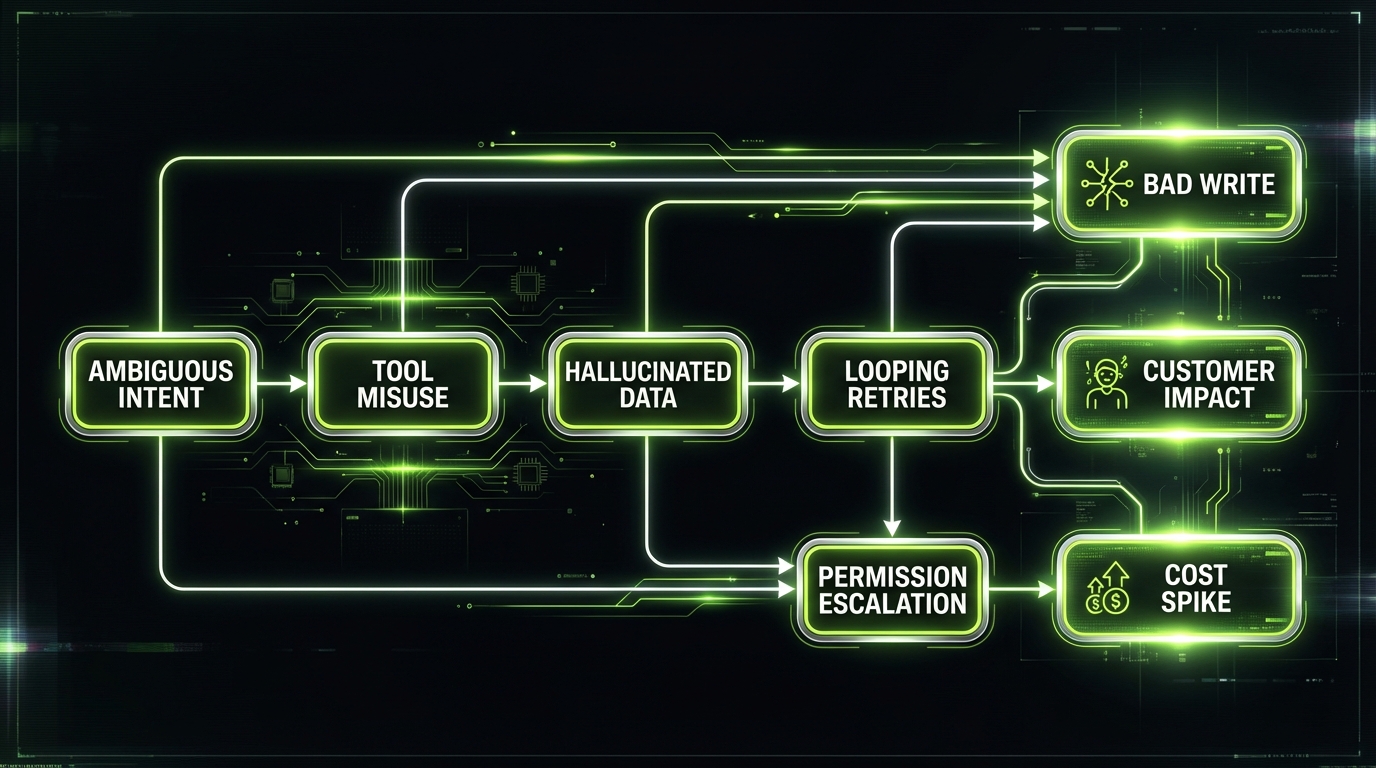
Most agent projects fail for predictable reasons. Not “AI is bad”. More like “we shipped an unbounded system with root access.”
Common pain points we see when teams push agents into real workflows:
- Ambiguous goals that produce plausible but wrong actions
- Tool sprawl where the agent can call everything
- No approval gates for irreversible steps
- No observability beyond raw chat logs
- No rollback plan when the agent misbehaves
Insight: If you can’t explain what the agent is allowed to do in one paragraph, you don’t have a shippable scope yet.
The hidden cost curve
Agents look cheap when you measure only tokens. The real costs are:
- Engineering time for tool wrappers, permissions, and audit logs
- Evaluation time for edge cases and regressions
- Ops time when the agent loops or spams tools
Track these costs early. Otherwise “automation” becomes a new support queue.
Where agents help most
Based on what holds up in delivery, agents are strongest in workflows with:
- Clear inputs and outputs
- A small set of tools
- Easy validation (rules, schemas, deterministic checks)
- Human review on the final step
Examples:
- Triage and draft (support, compliance, procurement)
- Data extraction and reconciliation
- Internal knowledge workflows with citations
A quick reality check
Ask two questions before you write a line of code:
- What is the smallest unit of work that creates value in 30 days?
- What would make this a clear win after 30 days?
We borrow this framing from how we diagnose product churn. It works for agent delivery too because it forces you to define a measurable value moment, not a vibe.
Agent boundaries that hold
Boundaries are your first safety system. They are also your best product decision.
Define boundaries in three layers:
- Task boundary: what workflows the agent can touch
- Data boundary: what data it can read and write
- Action boundary: what operations it can execute
Key Stat: In internal pilots, we often see the first stable gains when the agent scope is limited to one workflow and 3 to 5 tools. Treat this as an observation to validate with your own metrics.
What the agent can do
Write it as a contract. Keep it short.
- Draft artifacts: tickets, emails, summaries, reconciliation reports
- Propose actions: recommended next steps with evidence
- Execute low risk actions: create a draft, open a ticket, schedule a follow up
What the agent cannot do
Be explicit. Don’t hide this in policy docs.
- No irreversible writes without approval
- No permission changes
- No payments, refunds, or customer outreach by default
- No access to raw secrets or unrestricted file systems
Boundary spec template
Use this in your PRD or RFC:
- Goal: …
- In scope workflows: …
- Out of scope workflows: …
- Allowed tools: …
- Allowed actions per tool: …
- Max steps per run: …
- Max spend per run: …
- Required approvals: …
- Required logging: …
Agent Boundary Spec (v1)
- Primary job: create a draft vendor onboarding packet from a submitted form
- Reads: vendor form, policy docs, approved vendor list
- Writes: draft packet to staging folder, draft Jira ticket
- Cannot: email the vendor, approve the vendor, change access roles
- Tools: Docs API (read), Storage API (write staging only), Jira API (create ticket)
- Limits: 12 tool calls max, 2 retries per tool, stop after 5 minutes
- Approvals: compliance sign off required before any external send
- Logs: tool calls, inputs hashes, outputs, citations

Single agent vs multi agent boundaries
Multi agent systems fail in a new way: each agent is “small”, but the system becomes unbounded.
If you go multi agent, you still need one clear owner:
- A coordinator that enforces budgets and stop conditions
- Shared policy checks before any write
- A single audit trail across agents
Reference guardrails
_> Controls that scale with risk
Tool wrappers
Single place to enforce schemas, allow lists, retries, and logging. Keeps prompts simpler and failures debuggable.
Policy checks
Pre flight checks before any write. Treat them as code, not prompt text.
Approval gates
Human review for high risk actions with evidence and diffs. No hidden side effects.
Budgets and stop rules
Caps on steps, time, and spend per run. Stops loop storms early.
Staging writes
Draft first, publish later. Lets you validate outcomes before they hit systems of record.
Audit trails
Run level logs that show who approved what, which tools were called, and what evidence was used.
Tool access patterns and approvals
Tooling is where agentic AI becomes enterprise software. This is where you win or lose trust.
Least privilege by default
Agents should have the minimum access needed for the current workflow.
- Use scoped tokens per tool and per environment
- Prefer read only access until you prove value
- Restrict writes to staging locations first
- Separate credentials for pilot vs production
Practical patterns:
- Per run short lived credentials
- Tool wrappers that enforce schemas and rate limits
- Allow lists for endpoints and fields
Scoped permissions that map to business risk
A clean approach is to map tool calls to risk tiers.
| Tool action | Example | Risk tier | Default control |
|---|---|---|---|
| Read internal docs | Fetch policy page | Low | Allowed, logged |
| Create draft | Draft email, draft ticket | Medium | Allowed, logged, schema checks |
| Write to system of record | Update CRM field | High | Human approval gate |
| External side effects | Send email, trigger payment | Critical | Dual approval, throttles, canary |
Insight: If a tool call can create customer impact, treat it like a production deploy. Same discipline. Same audit trail.
Human approval gates for high risk actions
Approvals are not a failure. They are how you ship.
Use approval gates when:
- The action is irreversible
- The blast radius is unclear
- The agent is acting on uncertain evidence
- Compliance requires a named approver
Approval gate design checklist:
- Show the proposed action in plain language
- Show the evidence and citations
- Show the diff for record changes
- Provide approve, edit, reject, and escalate paths
- Log who approved and why
Approval payload example
- Action: Update customer tier from Silver to Gold
- Evidence: usage report (link), contract addendum (link)
- Diff: tier=Silver -> tier=Gold, discount=5 -> 10
- Risk: revenue impact, contract compliance
- Approver: account owner
Reference architectures
Pick the simplest architecture that can meet your risk and throughput needs.
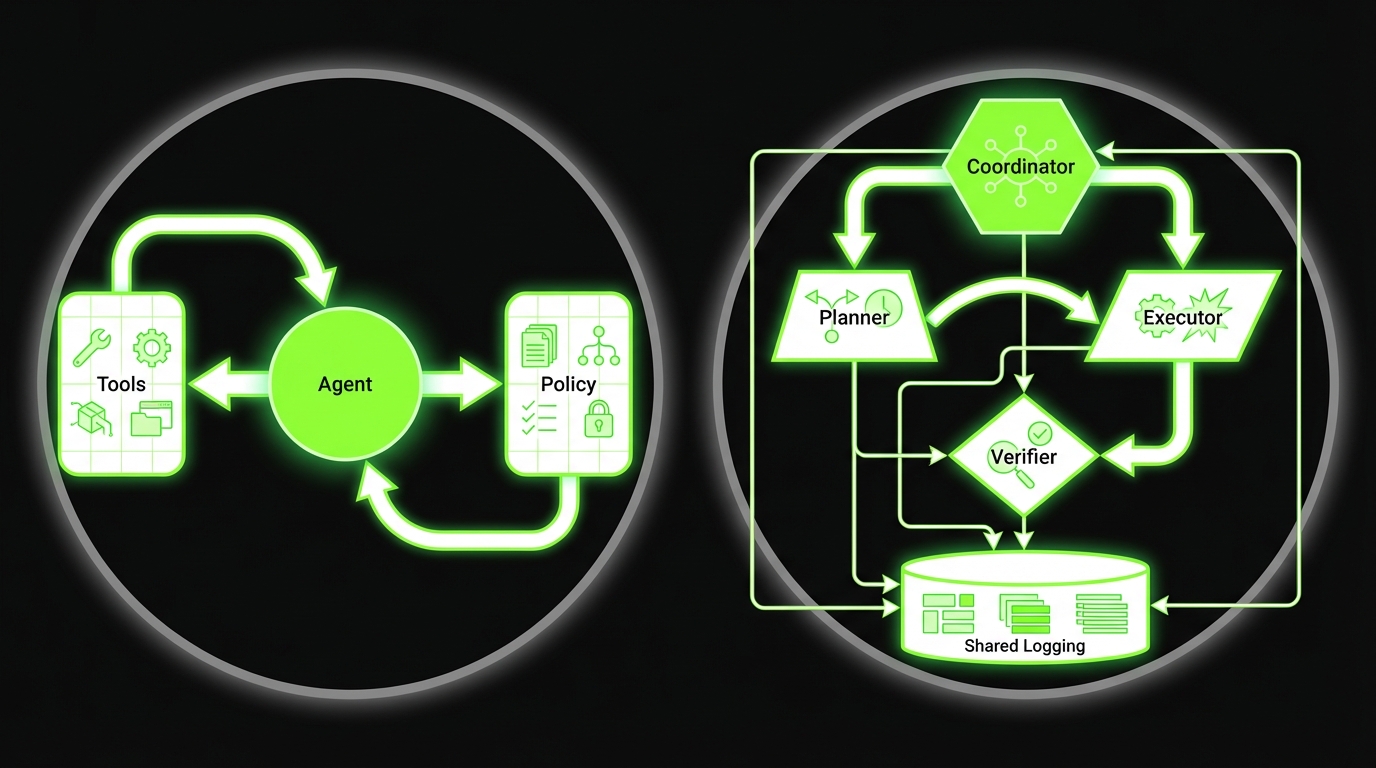
Single agent architecture
Good for one workflow with tight scope.
- One agent
- One tool router
- One policy layer
Pros:
- Easier debugging
- Clear ownership
- Faster to ship
Cons:
- Can get messy as workflows grow
Multi agent architecture
Good when you need separation of concerns.
- Planner agent
- Tool executor agent
- Critic or verifier agent
- Coordinator enforcing budgets and stop rules
Pros:
- Cleaner roles
- Better parallelism
Cons:
- More failure modes
- Harder observability
A note on regulated industries
If you work in regulated industries, assume you will need:
- Audit logs that an auditor can read
- Data minimization and retention rules
- Clear separation of environments
- A documented approval process
This is where “compliance by design” stops being a slogan and becomes a backlog item you can estimate.
Not usually. Start with a single agent plus strong tool wrappers and policy checks. Go multi agent when roles are clearly separable and you can afford the extra observability work.
In code, enforced at the tool layer. Prompts can be ignored. Tool wrappers can’t.
You reduce them with grounding, validators, and refusal rules. For critical actions, require citations and deterministic checks before any write.
One narrow workflow, draft first outputs, and a clear KPI target for 30 days. Many teams ship a focused PoC or MVP in 4 to 12 weeks, but the scope has to be real.
Tool calls, approval events, evidence links, and run outcomes. Redact sensitive data. Keep retention rules explicit.
Failure modes you must design for
Agents fail differently than normal software. They don’t just throw exceptions. They produce confident nonsense, then keep going.
The four common failure modes
Loops
- Repeating the same tool call
- Retry storms on rate limits
Hallucinations
- Invented facts
- Fabricated citations
Tool misuse
- Wrong endpoint
- Wrong parameters
- Writes to the wrong record
Goal drift
- The agent optimizes for “finish” not “correct”
Key Stat: In evaluation work on internal assistants, the biggest quality jump often comes from adding deterministic validators and stop conditions, not from swapping models. Treat this as a hypothesis and measure it.
Guardrails that actually work
Use layered defenses. No single guardrail is enough.
- Stop conditions: max steps, max time, max spend
- Validators: JSON schema, regex for IDs, required fields
- Grounding: retrieval with citations, refuse if no sources
- Tool sandboxing: staging writes, dry runs
- Rate limiting: per tool, per user, per run
- Fallback modes: escalate to human, or switch to draft only
Observability you need on day one
If you can’t debug it, you can’t ship it.
- Tool call traces with inputs and outputs
- Model prompts and responses (with redaction)
- Run level metrics: steps, retries, failures
- Outcome labels from humans: correct, incorrect, unsafe
Minimum run log fields
- run_id
- workflow_name
- user_id (or service account)
- tools_called[]
- steps_count
- total_tokens
- total_cost
- approval_events[]
- final_outcome (success, rejected, failed)
- failure_reason (loop, validation, tool error, hallucination)
A grounded example from delivery
When we built a real time conversational AI avatar with a brand experience agency, the hard part was not “getting it to talk”. It was latency and control.
- Audio streaming had to be stable
- Responses had to stay within tight timing
- We needed clear fallback behavior when the system could not respond fast enough
Example: That project shipped in 4 weeks. The lesson for agent workflows is simple: define the failure behavior early. Silence, safe refusal, or handoff beats a confident wrong answer.
Testing for loops and tool misuse
Treat it like integration testing. You need end to end tests, not just unit tests.
Create a small evaluation set:
- 20 normal tasks
- 10 ambiguous tasks
- 10 adversarial tasks (prompt injection, weird IDs)
Then track:
- Loop rate
- Tool error rate
- Human rejection rate
- Time to recover
Rollout stages that work
_> Pilot, guarded rollout, then scale
→ Scroll to see all steps
Conclusion
Agentic AI is not a single feature. It is a workflow system with a model in the middle.
If you want enterprise AI agents that don’t create a new category of incidents, ship in this order:
- Scope a single workflow
- Define boundaries in writing
- Wrap tools with least privilege and validators
- Add approvals for high risk actions
- Instrument everything
- Roll out in stages
Next steps you can do this week:
- Write a one page boundary spec for your first agent workflow
- Build a risk register for the top 10 actions
- Pick 4 KPIs and add them to your dashboard
- Run a pilot with staging writes and human review
Insight: The teams that win don’t chase autonomy. They chase reliable work completed at a known cost and risk level.
What to measure first
Start with four numbers:
- Success rate (approved outcomes divided by runs)
- Cost per task (model plus tool calls plus human review time)
- Time saved (baseline minus assisted time)
- Incident rate (unsafe attempts, policy violations, tool misuse)
If you can’t measure these, you can’t scale responsibly.
KPIs to run the program
_> If you can’t measure it, you can’t ship it safely
Cost per task
Total cost divided by completed tasks. Include model spend, tool costs, and human review time.
Success rate
Approved outcomes divided by runs. Track by workflow and by risk tier.
Time saved
Baseline time minus assisted time. Use time studies or task completion telemetry.
Escalation rate
How often the agent hands off to a human. High is fine early. It should drop as validators improve.
Rework rate
How often humans must redo the work. This is where “looks good” systems get exposed.
Incident rate
Unsafe attempts, policy violations, and tool misuse per 1,000 runs. Tie it to alerting and postmortems.