Introduction
If you price and optimize AI by tokens, you will miss the number that matters: cost per successful task.
Tokens are a meter, not a business outcome. Your customers do not pay for tokens. They pay for a job done: a support ticket resolved, a product description approved, a report generated, a lead qualified.
This guide reframes AI unit economics around tasks. It also gets practical: cost drivers, routing patterns, caching, latency tradeoffs, and cost observability you can actually ship.
You will see these keywords throughout because they map to real engineering decisions:
- LLM cost per request is useful, but incomplete
- reduce token costs is a tactic, not a strategy
- AI unit economics is the strategy
- model routing strategy is where most savings live
Insight: The fastest way to blow SaaS margins is to treat every user action like it deserves the best model, the largest context, and unlimited retries.
Here is the mental model we use in delivery: start with the task, define success, then measure cost to reach that success under production constraints.
What we mean by a task
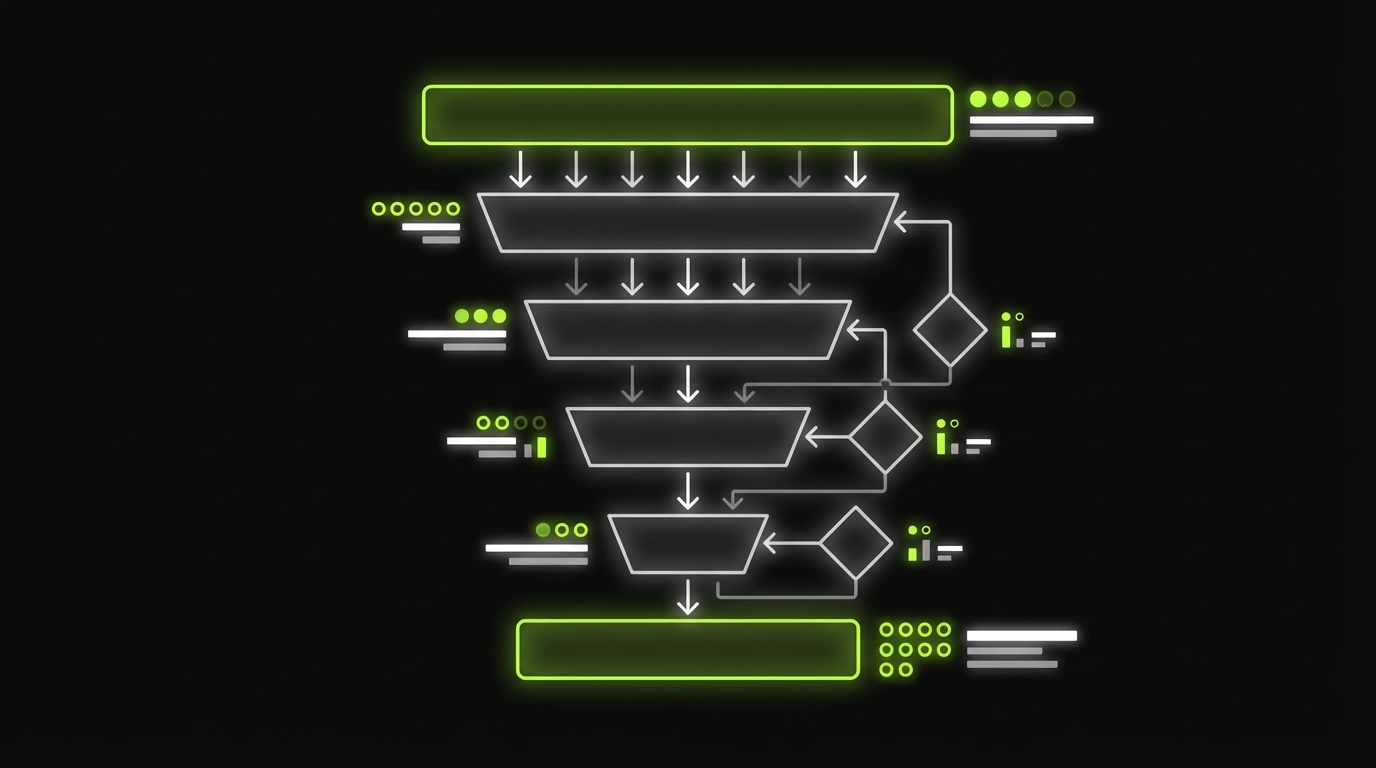
A task is a user level outcome with a pass fail definition.
Examples:
- Draft email that passes a tone and policy check
- Classify an inbound ticket correctly and route it to the right queue
- Summarize a long document into a template with required fields filled
- Answer a question with citations and a confidence threshold
A task usually includes multiple operations:
- Retrieve context
- Call one or more models
- Call tools (search, database, CRM)
- Validate output
- Retry or escalate if needed
That is why cost per token is not enough. The unit is the workflow, not the call.
AI unit economics basics
A good unit economics view answers one question: what do we spend to produce one successful outcome.
Most teams start with “tokens in, tokens out.” Then they ship. Then the bill arrives.
Common failure modes we see:
- You measure average token usage, but tail latency drives timeouts and retries
- You optimize prompts, but tool calls are the real cost center
- You pick one model, then pay premium rates for trivial tasks
- You track cost per request, but your product value is per feature and per tenant
Key Stat: In SaaS, a small per workflow cost increase compounds fast. At 1.5M workflows per month, a $0.01 increase is $15,000 monthly.
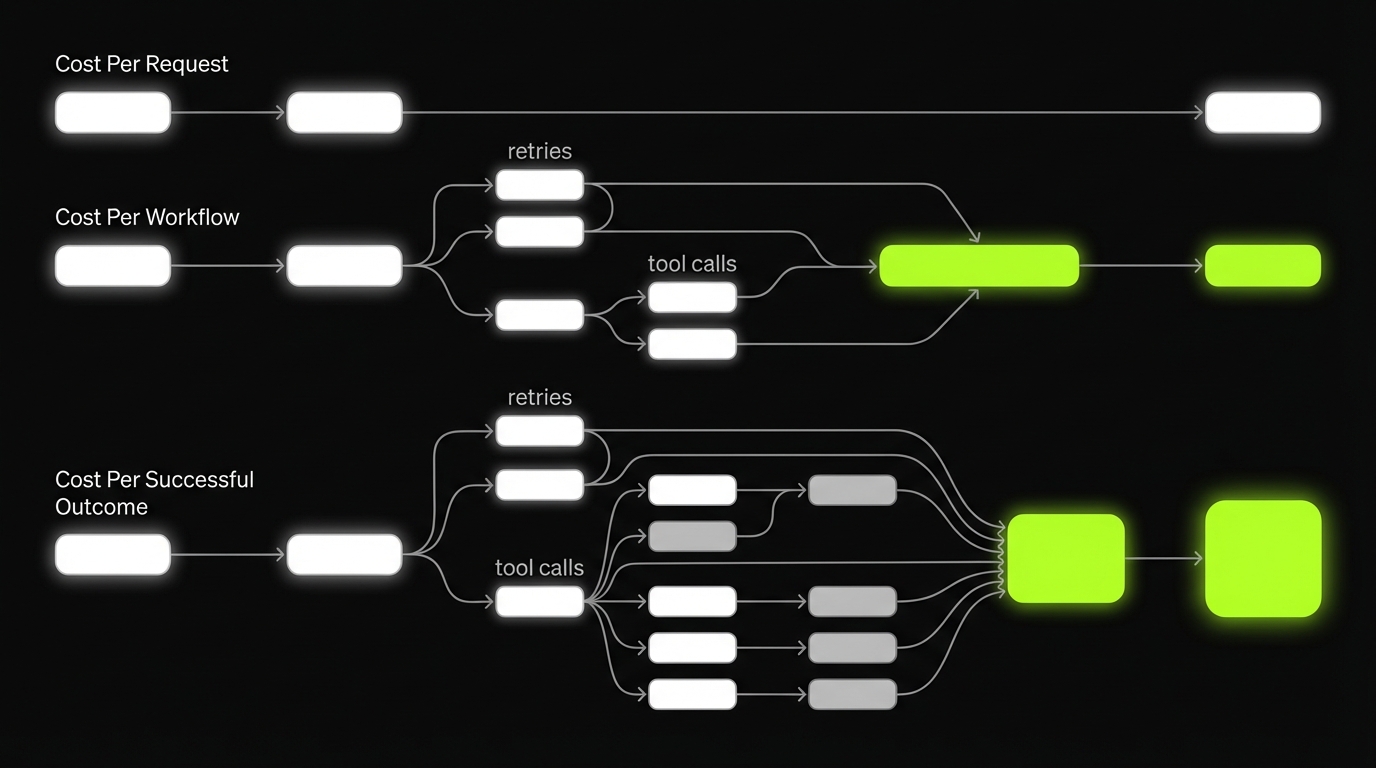
This is why LLM cost per request is only a stepping stone. The target metric is cost per successful outcome, split by feature and tenant.
Quick definitions
- Cost per request: cost of one LLM API call
- Cost per workflow: cost of all calls and tools needed for a user action
- Cost per successful outcome: cost per workflow that meets the acceptance criteria
What to track from day one
- Cost per workflow by feature
- Success rate and fallback rate
- Latency percentiles, not just averages
- Gross margin per tenant when AI usage is tenant driven
Proof points from delivery
In our work building SaaS products and AI enabled workflows, the pattern is consistent: teams that add observability and routing early keep spend predictable.
We have shipped 360+ projects across industries where cost control was not optional because growth meant more traffic and more support load.
A non AI example still matters here. For ExpoDubai 2020, we built a virtual platform that served 2 million visitors. That kind of scale forces discipline: you do not get to guess where cost and latency come from. The same mindset applies to AI workflows.
Example: When traffic spikes, the system does not fail politely. It fails at the edges: timeouts, retries, and cascading tool calls. Those are the exact cost multipliers in LLM workflows too.
_> Unit economics signals
The few numbers that keep AI spend honest
Cost drivers you can control
If you want to reduce spend without quality loss, you need to know what actually drives cost.
Here are the big four, in the order we usually see them bite teams in production.
- Context length: long prompts, long histories, huge retrieved chunks
- Model choice: premium model everywhere, no routing
- Tool calls: search, database, web scraping, OCR, vector queries
- Retries: timeouts, validation failures, “try again” loops
Insight: Retries are the silent killer. They inflate cost and they inflate latency, which then causes more retries.
Context length: the hidden tax
Context grows for innocent reasons:
- You keep full chat history instead of a rolling summary
- Retrieval returns 20 chunks because “more context is safer”
- You include raw logs, tables, and JSON blobs
Controls that work:
- Set a hard context budget per workflow step
- Summarize history into a task specific state
- Retrieve fewer, better chunks and measure hit rate
Model choice: stop paying premium for everything
A single model approach is easy to ship, hard to scale.
A practical model routing strategy:
- Small model for classification, extraction, and routing
- Medium model for drafting and rewriting
- Large model only for ambiguous, high stakes, or low confidence cases
Tool calls: every tool is a billable dependency
Tool calls often dominate when:
- You do multi step agent loops
- You run web search for every query
- You query the vector store multiple times per turn
Controls that work:
- Cache tool responses with a clear TTL
- Batch tool calls when possible
- Add a “tool budget” per workflow
Retries: design them, do not let them happen
Retries come from:
- Model hallucinations failing validation
- Rate limits and transient errors
- Long contexts causing timeouts
Controls that work:
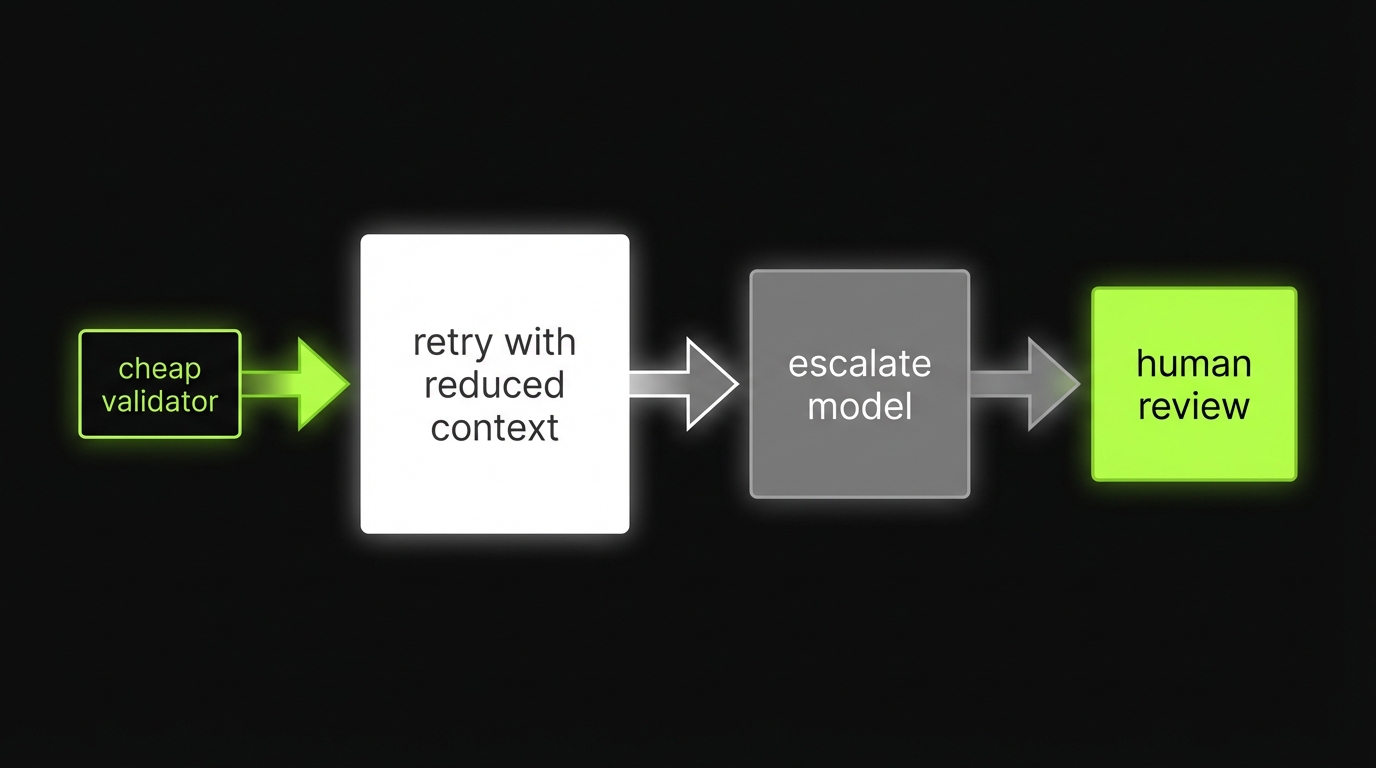
- Validate outputs with cheap checks first
- Retry with smaller context before escalating model
- Use circuit breakers and backoff
Cost driver checklist
Use this as a pre release checklist for any AI feature:
- Do we have a context budget and a trimming rule?
- Do we have at least two models with a routing rule?
- Do we cap tool calls per workflow?
- Do we validate outputs and bound retries?
- Do we record cost and latency per tenant and per feature?
If you cannot answer one of these, you are not ready to scale usage.
Reference patterns you can ship
_> Small set of building blocks, reused everywhere
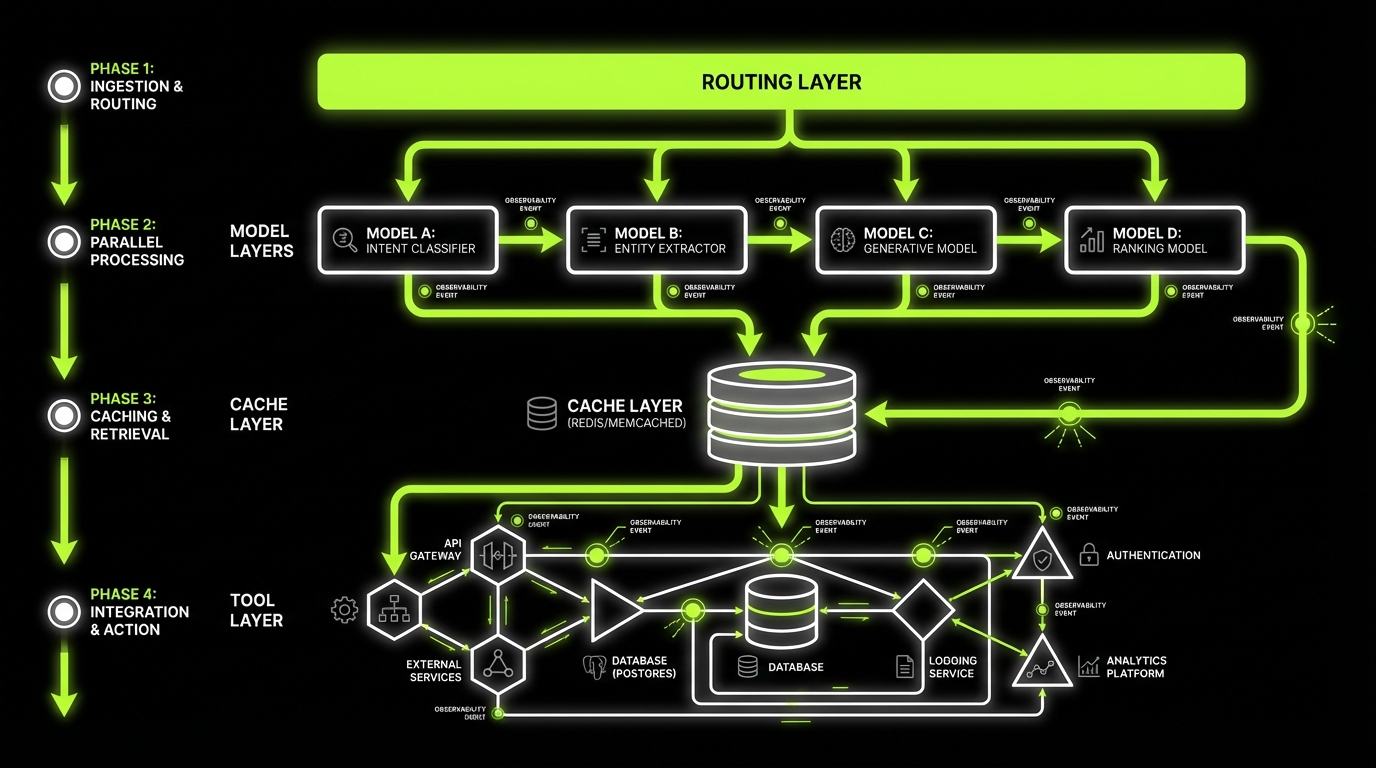
Router layer
Central place to choose model, context budget, and tool policy per task and tenant.
Cache layer
Embeddings cache, tool response cache, and optional output cache with strict keys and TTL.
Summarization step
Turns long history into task state so context stays bounded and stable.
Batch lane
Moves non interactive work off the request path to reduce peak spend and stabilize latency.
Validators
Cheap checks that prevent expensive retries and catch format and policy issues early.
Circuit breakers
Caps retries and tool calls, then degrades gracefully to a safe fallback or human review.
Routing and reference patterns
Most teams ask, “How do we reduce token costs?”
A better question: “How do we get the same success rate with cheaper steps?” That is routing plus reuse.
Pattern 1: Cheap first pass, escalate on demand
This is the default pattern we recommend.
- Small model does intent classification and risk scoring
- Medium model drafts output
- Validators check format, policy, and factual constraints
- Large model only runs when confidence is low or impact is high
This routing pattern improves margins because most traffic is boring.
Pattern 2: Router, cache, batch, summarize
These four patterns show up in almost every production system.
| Pattern | What it does | When it works | Common failure |
|---|---|---|---|
| Router | Picks model and tools based on intent and risk | High volume mixed queries | Router too complex, becomes untestable |
| Cache | Reuses embeddings, results, tool responses | Repeated queries, shared docs | Cache keys too loose, wrong answers |
| Batch | Groups requests to reduce overhead | Back office tasks, nightly jobs | Adds latency, hurts conversion |
| Summarize | Shrinks context while keeping task state | Long chats, long docs | Summary drifts, loses constraints |
Insight: Routing wins are usually bigger than prompt wins. Prompt work matters, but routing changes the distribution of spend.
Pattern 3: Guardrails before big models
Before you pay for a premium call, check if you even need it.
Examples of cheap gates:
- Regex and schema validation
- Policy keyword checks
- Retrieval hit quality checks
- Duplicate detection
Pattern 4: Human review for edge cases
Some tasks should not be “AI only.”
Add a human review lane when:
- The output changes money movement
- The output has legal or compliance impact
- The model confidence is low and the user is about to churn
This is not anti automation. It is margin protection.
A simple router rule set
Start simple. You can always add nuance.
- If task is classification or extraction, use small model
- If task is drafting with clear constraints, use medium model
- If task needs deep reasoning or has low confidence, use large model
- If user is on a low tier plan, cap escalations
- If tenant has strict compliance, force citations and stricter validation
The key is to encode this as configuration, not scattered if statements.
Use this when an AI feature is working, but the bill is climbing.
- Measure cost per successful outcome for the workflow.
- Split cost into: model calls, tool calls, retries.
- Add validators and cap retries.
- Implement cheap first pass routing.
- Reduce context with summarization and retrieval budgets.
- Cache: embeddings, tool responses, and final outputs where safe.
- Re test success rate and p95 latency after each change.
What usually fails:
- Optimizing prompts while ignoring tool calls
- Adding a complex agent loop without a tool budget
- Caching without strict keys, then serving wrong answers
What to do instead:
- Start with a single workflow.
- Ship instrumentation first.
- Make one change at a time and measure deltas.
Implementation path
_> A safe sequence for existing products
→ Scroll to see all steps
Cost model worksheet and KPIs
If you cannot estimate cost before you ship, you will learn the hard way.
This worksheet is meant to be used in a spreadsheet. It also maps cleanly to instrumentation.
Cost model worksheet
Define variables per workflow:
- N: requests per month
- p_success: probability workflow succeeds without human review
- n_calls: average LLM calls per workflow
- c_call_i: cost of LLM call i
- n_tool: average tool calls per workflow
- c_tool_j: cost of tool call j
- r: average retries per workflow
- c_retry: average incremental cost per retry
- t_p50, t_p95: latency percentiles
- p_drop(t): conversion drop as latency increases (measure this)
Formulas:
- Cost per workflow = sum(c_call_i) + sum(c_tool_j) + r * c_retry
- Cost per successful outcome = Cost per workflow / p_success
- Monthly AI cost = N * Cost per workflow
- Gross margin per tenant = Revenue per tenant - AI cost per tenant - infra cost per tenant
A quick example you can sanity check:
N = 200,000 workflows/month
Cost per workflow = $0.012
p_success = 0.92
Cost per successful outcome = 0.012 / 0.92 = $0.0130
Monthly AI cost = 200,000 * 0.012 = $2,400
Key Stat: Cost per successful outcome is the metric that exposes hidden retries and low quality. Cost per request hides them.
KPIs that map to business outcomes
Track these weekly:
- Cost per successful outcome per workflow
- LLM cost per request by model and endpoint
- Gross margin per tenant and margin delta from AI features
- Escalation rate to premium model
- Retry rate and timeout rate
- Cache hit rate for embeddings and tool responses
- Latency p50 and p95 per workflow
Latency vs cost tradeoffs that impact conversion
Low cost is not the goal if it kills conversion.
Tradeoffs to make explicit:
- Batch processing reduces cost but increases time to value
- Smaller models reduce cost but may reduce success rate, causing retries
- Aggressive caching reduces cost but can serve stale answers
Measure the user impact, not just the bill.
Insight: A $0.003 saving is pointless if it increases p95 latency enough to drop trial to paid conversion. Treat latency as a revenue variable.

How to tie latency to conversion
If you do not have conversion by latency today, treat this as a hypothesis and test it.
A simple approach:
- Log end to end workflow latency and outcome
- Segment users by latency buckets (for example: under 2s, 2 to 5s, 5 to 10s, over 10s)
- Compare completion rate and next action rate per bucket
- Use that to set a p95 latency budget per workflow
This is the bridge between engineering metrics and pricing strategy.
What good looks like
Predictable margins
You can forecast AI cost by tenant and feature and price accordingly.
Better user experience
Lower p95 latency and fewer retries means fewer abandoned flows.
Faster iteration
Routing and budgets make experiments safer. You can test models without blowing spend.
Cleaner compliance posture
Observability and validation create an audit trail for high risk workflows.
Conclusion
AI unit economics gets easier when you stop arguing about tokens and start measuring tasks.
If you want a practical starting point, do these in order:
- Define success for each workflow. Make it measurable.
- Instrument cost and latency per workflow step.
- Add a model routing strategy with cheap first pass and escalation.
- Cache embeddings, results, and tool responses with safe keys and TTLs.
- Cap retries and add validators before premium calls.
- Report gross margin per tenant and cost per successful outcome weekly.
Insight: The best cost control is good product design. Fewer steps, fewer calls, fewer chances to retry.
If you are building a SaaS product and growth is turning into a bigger bill, treat this like any other scaling problem: boundaries, budgets, and observability. The same discipline that keeps cloud spend predictable will keep LLM spend predictable too.
Next steps you can take this week:
- Pick one expensive workflow and build the worksheet for it
- Add routing and caching to that workflow only
- Run an A B test on latency and success rate
- Decide pricing based on cost per successful outcome, not tokens
That is how you protect margins without shipping worse AI.
Yes, but treat it as a component metric. The decision metric is cost per workflow and cost per successful outcome. A cheap request that causes retries is not cheap.
Start with context budgets and summarization. Then add routing so only hard cases hit expensive models. Finally, add validators to prevent retries. Measure success rate and p95 latency after every change.
Caching is risky when the cache key does not capture the full context that changes the answer. Start with embeddings and tool responses. Add output caching only for deterministic prompts and stable inputs.
Two models and one router rule is enough. Use a smaller model for classification and extraction, and a stronger model for generation. Escalate only when validators fail or confidence is low.
Report cost per successful outcome and gross margin per tenant. Break it down by feature. Tie latency to conversion so product can see the revenue impact of performance.